Saints Row 2 Juiced Patch

If choice is between GotR and DLCs, personally, I'll go with second option. GotR has nice things in it, but also things I don't want, so if I can play DLCs I can live without GotR.

Edit: chances are my words above will age poorly. We will see.
 
Last edited:
Theres no other way around it unless people remake these mods to cater the DLC.

GOTR touches the memory limits as-is, its just no one ever noticed anything because the only way that it told you it was hitting memory limits was through internal logging.

It is *possible* (with a massive grain of salt) to increase these limits but we'd risk breaking peoples games in various ways or it would be too much trouble than its worth
i mainly use graphical mods, how hard would it be to recreate them to be usable outside of implmenting them via GoTR?

this is what i used to mod my game, with the addition of some of clippy's stuff
 
i mainly use graphical mods, how hard would it be to recreate them to be usable outside of implmenting them via GoTR?

this is what i used to mod my game, with the addition of some of clippy's stuff
That depends which graphic mod you want to use.. some of them includes new textures on objects.

Usually you can just drag these files without using GotR:
- temperature_effects.xtbl
- time_of_day.xtbl
- time_of_day_objects.xtbl
- weather.xtbl
- Weather_text.xtbl
- weather_time_of_day.xtbl
- wind.xtbl

Files related with missions to not cause a crash:
- bon01-lightset.xtbl
- bon02-lightset.xtbl
- BR04-02.xtbl
- rn09.lua
- RO05-02-lightset.xtbl
- RO09-01.xtbl
- RO09-02.xtbl
- SS02-02-Lightset.xtbl
- TSSE04-01-lightset.xtbl
 
GOTR touches the memory limits as-is, its just no one ever noticed anything because the only way that it told you it was hitting memory limits was through internal logging.
It makes sense. I remember getting told by a developer that old Saints Row games had to plan their DLCs pre-production just so they can allocate the memory for all the things DLCs would add since the engine didn't support patching that in. I assume all the extra space that was allocated for the unreleased DLCs ended up being used by GOTR.

Tho I'm curious, what exactly is affected by this? I assume all the extra clothing options cause the issues, but anything else?
 

Hi, hello and welcome! This is the official thread for SR2 Juiced Patch.​

View attachment 41715

Latest Juiced Patch version is
Saints-Row-2-Juiced-Patch

Latest Juiced Patch LITE version is v1.5.1.
(Juiced Patch LITE is discontinued as of 6/11/2025, but still available to download.)

What is Juiced Patch?

Juiced Patch is a collaboration of fixes and enhancements for Saints Row 2 created by Me, Tervel and Clippy95
using an inject-able DLL file running using the Monkey Patch framework backend by Scanti.

What features and/or fixes does Juiced Patch include?


- Crash Fixes
- Better Windowed mode support
- Borderless Windowed replacement for Windowed
- Fixed FPS by the use of the SleepHack option (Note: this option heavily increases CPU usage.)
- An Uncap FPS Toggle Slightly Extended Render Distance
- Fixed Cutscene/Object Syncage
- Fixed audio playback on Windows Machines
- Slew Mode (Freecam)
- Loose VPP Content loading
- LUA Executor Console
- many bug fixes
and much... much more.

Where can i download this?​

You can download SR2 Juiced Patch right from the official Kobraworks Website or directly from GitHub

Older versions are located at Google Drive folder or Mega.NZ

The source code for Juiced Patch is available at our GitHub page , Updated very regularly.

Is there a detailed change-log list so i can see each and every new addition?​

Yes! We host it in both of the Mega.NZ and Google Drive folders, here's a quick link to access that changelog.

HOW TO INSTALL​

Simply drag all of the contents in the zip file of the Juiced Patch version you just installed (besides readme.txt) into your Saints Row 2 Game Files, edit and configure juiced.ini, run your game. Its as simple as that.

Showcases​

Dude, why the hell did you just have to mess with the controller input settings and completely break Nucleus i play splitscreen and this patch would work fine but i see for NO reason you decided to put your own controller nonsense and the ini does not work it detects controllers no matter what, i know this was not made for that, but even so it pisses me off so much you mess with a setting that worked perfectly fine before. Screw you now i gotta reinstall and find a different patch that doesn't have intrusive settings.
 
Last edited by a moderator:
Dude, why the hell did you just have to mess with the controller input settings and completely break Nucleus i play splitscreen and this patch would work fine but i see for NO reason you decided to put your own controller nonsense and the ini does not work it detects controllers no matter what, i know this was not made for that, but even so it pisses me off so much you mess with a setting that worked perfectly fine before. Screw you now i gotta reinstall and find a different patch that doesn't have intrusive settings.
Calm down bucko. You can try adding SDL=0 in the ini if its not present. Otherwise revert to a juiced version before SDL was implemented. On another note alot of various controllers in fact did not work correctly in alot of cases without 3rd party tools such as xinput mapping programs and of the such. SDL is a huge library for basically various controllers to be supported, which heavily expanded what saints row 2 would natively support. But on another topic you could also simply ask whoever made nucleus to look at juiced to see if they can work around it. I mean juiced is open source after all. But you do have options. Try SDL=0 or revert to a juiced version prior to SDL being added. No need to come out and about and get so heated.
 
Dude, why the hell did you just have to mess with the controller input settings and completely break Nucleus i play splitscreen and this patch would work fine but i see for NO reason you decided to put your own controller nonsense and the ini does not work it detects controllers no matter what, i know this was not made for that, but even so it pisses me off so much you mess with a setting that worked perfectly fine before. Screw you now i gotta reinstall and find a different patch that doesn't have intrusive settings.
chill bro, there's no need to be agressive about this
 
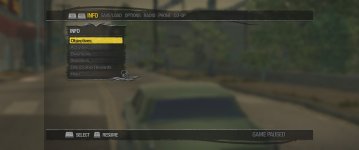
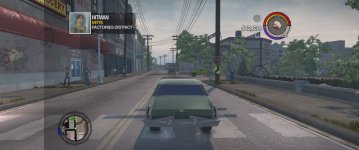
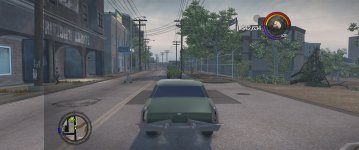
hello, not sure if its a juiced bug but i am running juiced patch. i get an overlay of the pause menu either i think when i pause for a while OR when i select a hitman target. its like the pause menu shadow stays on the screen all the time until i restart the game but it stays even if i deselect the target.
you can see it in the photos on the left of the screen where the black line is
 

Attachments

  • 20260416083341_1.jpg
    20260416083341_1.jpg
    282.9 KB · Views: 90
  • 20260416083343_1.jpg
    20260416083343_1.jpg
    811.8 KB · Views: 91
  • 20260416083351_1.jpg
    20260416083351_1.jpg
    866.9 KB · Views: 96
hello, not sure if its a juiced bug but i am running juiced patch. i get an overlay of the pause menu either i think when i pause for a while OR when i select a hitman target. its like the pause menu shadow stays on the screen all the time until i restart the game but it stays even if i deselect the target.
you can see it in the photos on the left of the screen where the black line is
RemoveVignette=1 in ini
 
Can I also give my 5 cents on suggestions?

1. Would it be possible to sync current radio and songs in CO-OP? (not syncing by each second, but atleast so that there will be the same song playing).

2. Would it possible to add a toggle feature, so that NPCs and players will sit in the closest car seat (if driver is occupied), instead of specific order: Driver -> Front passenger -> Left back passenger -> Right back passenger. Maybe also ability to change seat from front passenger to driver if driver isn't occupied and you pressed movement input. (Just like in GTA 5/O), you already can sit in driver through passenger's seat, so sounds possible.
 
Back
Top