Saints Row 2: Juiced Patch Mod Manager

preview1.png

SR2JP Mod Manager
This project aims to ease the process of enabling, installing, uninstalling, disabling mods and finding conflicts between mods that are to be installed using Juiced Patch
Features
  • Very portable (Drag to desktop, run, link to your SR2 folder, and get managing!)
  • Conflict Checker (Checks all your mods and compares with others, tells you what files conflict between mods)
  • Auto-import mods directly from zip/7z/rar to your Juiced Patch mods folder in one single click
  • Load order adjustments without touching loose.txt
  • Enable/Disable mods directly from manager without deleting them.
  • Delete mods directly from manager.
How to use?
Simply download it, drag it wherever you would like to store it, open it, direct it to your Saints Row 2 game folder when it asks, and get to managing.

Download
Please make a GitHub issue, Comment here or ping me in Kobraworks if there is any issues.
 
This is a game changer. Thank you!

The only feedback I have for now is the Conflict Checker text is a bit small, especially compared to the main window (left in screenshot).
As a workaround, the user could click the window, ctrl + A then ctrl + c to copy all of them then paste in Notepad++ or similiar.
1774778714613.png


Will check and offer feedback for mod installation features when I've tried them out!
 
Last edited:
This is a game changer. Thank you Uzis!

The only feedback I have for now is the Conflict Checker text is a bit small, especially compared to the main window (left in screenshot).
As a workaround, the user could click the window, ctrl + A then ctrl + c to copy all of them then paste in Notepad++ or similiar.
View attachment 48598

Will check and offer feedback for mod installation features when I've tried them out!
yeah i have ideas to improve that entire window as a whole, theres definitely better ways to format that
 
This will hopefully streamline the process for those wanting to enjoy our mods!


A couple of issues I've noticed on release:

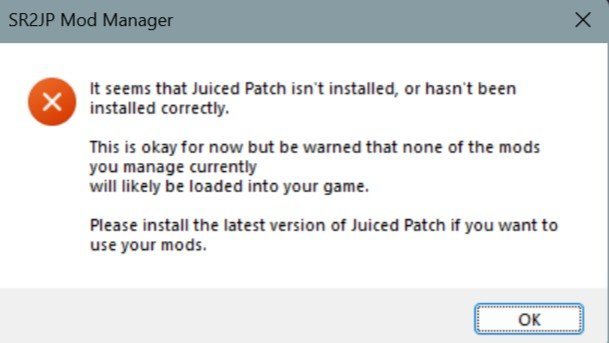
1. I get this error every time on launch (it works fine though):
Juiced_Mod_Manager_v1.0_Incorrect_Error.jpg
I am using an older Juiced version atm, though (v7.6.0).


2. Would it be possible to either:
A. Install non-zipped folders?
B. Have all folders inside a zip be installed, and allow the user to enable whichever folder they want through the manager?​

Reason I ask is because many mods have multiple optional versions of the same files. Eg: M2M has files which make clothing only $1, etc. Currently, installing M2M's .zip through the manager only installs the "1. Essential Files" folder, which means there's no way to install the optional files through the manager.
 
This will hopefully streamline the process for those wanting to enjoy our mods!


A couple of issues I've noticed on release:

1. I get this error every time on launch (it works fine though):
View attachment 48609
I am using an older Juiced version atm, though (v7.6.0).


2. Would it be possible to either:
A. Install non-zipped folders?​
B. Have all folders inside a zip be installed, and allow the user to enable whichever folder they want through the manager?​

Reason I ask is because many mods have multiple optional versions of the same files. Eg: M2M has files which make clothing only $1, etc. Currently, installing M2M's .zip through the manager only installs the "1. Essential Files" folder, which means there's no way to install the optional files through the manager.
yeah i can look into that for sure and it was planned, i just did install all at once for now with the zip installs

and yeah non-zipped folders is 100% possible

i think that error you get pops because the manager looks for SDL3 which is only in 8.0+

i can remove that check to make it nicer for older versions
 
so, with the mod manager, does this mean the "loose.txt" file no longer needed? I can see that we can adjust mods load order with the manager quickly, but have to manually sort them in the loose file
 
so, with the mod manager, does this mean the "loose.txt" file no longer needed? I can see that we can adjust mods load order with the manager quickly, but have to manually sort them in the loose file
No, loose.txt is crucial to how this program works, and is crucial to juiced patch as a whole

this just makes loose.txt and your mods folder less of a hassle to work with
 
Is it possible to add feature to change game directory? In menu bar or something. (If there is, I couldn't find it)
I have multiple SR2 installs, using Juiced's portable feature to not mix up sets of mods:
Untitled.png


Despite launching the exe in a different folder it still assumes old directory.


EDIT: I've also noticed the Conflict Checker still checks for mods not currently active;
Code:
Duplicate file: temperature_effects.xtbl
MySoftWeatherMod.mp4 - MyWeatherMod.mp4

Duplicate file: time_of_day.xtbl
MySoftWeatherMod.mp4 - MyWeatherMod.mp4

Duplicate file: weather.xtbl
MySoftWeatherMod.mp4 - MyWeatherMod.mp4

Duplicate file: Weather_text.xtbl
MySoftWeatherMod.mp4 - MyWeatherMod.mp4

Duplicate file: weather_time_of_day.xtbl
MySoftWeatherMod.mp4 - MyWeatherMod.mp4
I did a whoopsie and used the old ver (hence the formatting), tho this still persists in the new version even after unticking


I've checked loose.txt and MyWeatherMod.mp4 is not in there. Probably it will make it easier to troubleshoot conflicts in a messy folder if it had a toggle to not check for conflicts on inactive mods folders.

W & S are kinda neat shortcut keys, but it doesn't Ctrl+S to save yet.
 
Last edited:
Back
Top