
You are using an out of date browser. It may not display this or other websites correctly.
You should upgrade or use an alternative browser.
You should upgrade or use an alternative browser.
NPC Model Swap assistance
- Thread starter 3rdStreetSaint 212
- Start date


The tutorial is messy, but it should be easy enough to understand:

Thanks, I'll check it out when I get home.The tutorial is messy, but it should be easy enough to understand:
So I followed these instructions (and the instructions in the post above it) down to the last pixel, and just got the same results I've had every other time.Next, grab Viper's ASM Updater from this link: https://www.saintsrowmods.com/forum/threads/vipers-updated-asm-updater.13994/
Put the ASM_Updater folder into SRTT's main directory.
Put the packed STR2_PC files that you just packed into the folder alongside the vanilla character_container.asm_pc file from the SRTT character folder.
Run the Update_ASM_Files - after ADDITION or CHANGE of a mod file.bat and let it do its thing.
Done, start the game.
I did try watching that video, but there's a lot of things on that screen that I don't recognise. And no matter how loud I turn up my volume, there doesn't seem to be any audio, so I'm completely lost.
But thanks for trying, I'm sure this will help out a lot of people who's brains don't run on windows vista.
So, basically. You unpack both vpp_pc files using both games' respective tools (SRTT = GibbedTools, SRIV = ThomasJepp). You will use this throughout.So I followed these instructions (and the instructions in the post above it) down to the last pixel, and just got the same results I've had every other time.
I did try watching that video, but there's a lot of things on that screen that I don't recognise. And no matter how loud I turn up my volume, there doesn't seem to be any audio, so I'm completely lost.
But thanks for trying, I'm sure this will help out a lot of people who's brains don't run on windows vista.
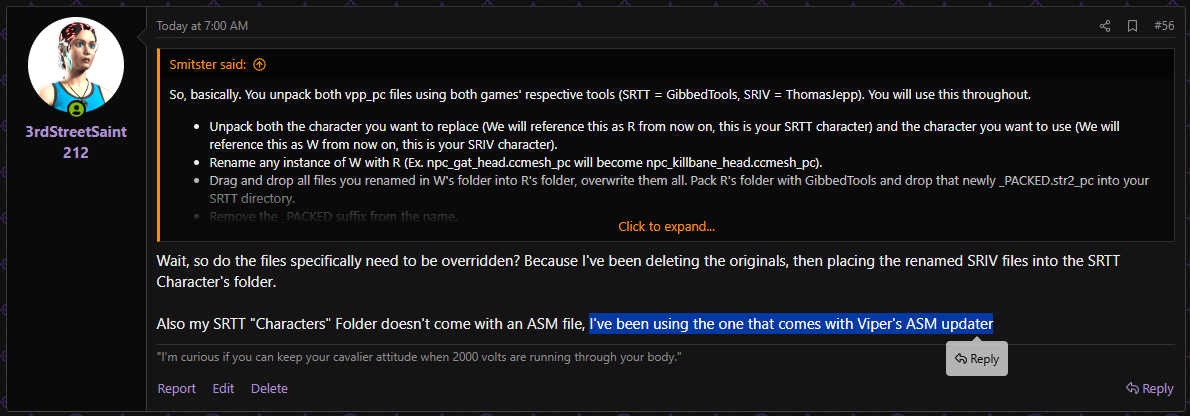
- Unpack both the character you want to replace (We will reference this as R from now on, this is your SRTT character) and the character you want to use (We will reference this as W from now on, this is your SRIV character).
- Rename any instance of W with R (Ex. npc_gat_head.ccmesh_pc will become npc_killbane_head.ccmesh_pc).
- Drag and drop all files you renamed in W's folder into R's folder, overwrite them all. Pack R's folder with GibbedTools and drop that newly _PACKED.str2_pc into your SRTT directory.
- Remove the _PACKED suffix from the name.
- Grab the character_containers.asm_pc file from the SRTT character packfile we unpacked using GibbedTools and set it into the main directory of SRTT.
- Download Viper's updated ASM Updater, extract it, and drag the ASM_Updater folder to the main directory of SRTT.
- Open that folder and run the Update_ASM_Files - after ADDITION or CHANGE of a mod file.bat.
- Open the game and enjoy the chaos you made!
Wait, so do the files specifically need to be overridden? Because I've been deleting the originals, then placing the renamed SRIV files into the SRTT Character's folder.So, basically. You unpack both vpp_pc files using both games' respective tools (SRTT = GibbedTools, SRIV = ThomasJepp). You will use this throughout.
- Unpack both the character you want to replace (We will reference this as R from now on, this is your SRTT character) and the character you want to use (We will reference this as W from now on, this is your SRIV character).
- Rename any instance of W with R (Ex. npc_gat_head.ccmesh_pc will become npc_killbane_head.ccmesh_pc).
- Drag and drop all files you renamed in W's folder into R's folder, overwrite them all. Pack R's folder with GibbedTools and drop that newly _PACKED.str2_pc into your SRTT directory.
- Remove the _PACKED suffix from the name.
- Grab the character_containers.asm_pc file from the SRTT character packfile we unpacked using GibbedTools and set it into the main directory of SRTT.
- Download Viper's updated ASM Updater, extract it, and drag the ASM_Updater folder to the main directory of SRTT.
- Open that folder and run the Update_ASM_Files - after ADDITION or CHANGE of a mod file.bat.
- Open the game and enjoy the chaos you made!
Also my SRTT "Characters" Folder doesn't come with an ASM file, I've been using the one that comes with Viper's ASM updater
No, it does the same thing if you delete or overwrite. The "Characters" folder is the unpacked VPP_PC we were talking about earlier.Wait, so do the files specifically need to be overridden? Because I've been deleting the originals, then placing the renamed SRIV files into the SRTT Character's folder.
Also my SRTT "Characters" Folder doesn't come with an ASM file, I've been using the one that comes with Viper's ASM updater
Yes, that's the one I mean. There is no asm file in the folder. Just a list of every character modelThe "Characters" folder is the unpacked VPP_PC we were talking about earlier.
Just use the one in Viper's Updated ASM Updater, just copy it to the main directory of SRTTYes, that's the one I mean. There is no asm file in the folder. Just a list of every character model
I feel like I'm going around in circles again.Just use the one in Viper's Updated ASM Updater, just copy it to the main directory of SRTT
So just to sum up, I've done this.
And yet still just end up with an invisible NPC that either warps the entire game, or crashes it completely.
I'm just gonna stop trying to make this mod myself, and hope that someone who knows what they're doing eventually has the time to make it, if they want to.
Last edited: