
Hey Admixon! Sorry to resurrect the thread but was wondering if there was a tutorial or more detailed instructions using WinMerge or editing the customization_items file. It wouldn't be too hard to figure out however this customization_items.xtbl is formatted differently then the one for mosaic censorship which make it very confusing which lines correspond to which change. For example the mosaic xtbl's first line is written as one continuous line corresponding to the hair style so the first line is all relating to cornrows style. Within yours it extends downward across 85 lines continuously so when you compare them in winmerge its very jumbled, totes not blaming you as I think the base customization_items.xtbl is formatted downward too its just trying to spot a needle in a haystack comparing as it marks practically every line red due to it being formatted differently, I tried this on 4 different occasions trying to figure it out before I gave up, reading thru 85 lines for 1 hairstyle to cross-reference with the other singular line made me call it quits. If I just knew what line/lines correspond to clothing restrictions tha'd be immensely more helpful to use in Notepad++ an make the edit manually then try to decipher WinMerge's inability to realize line of code are the same just on a different line. Who knows, possibly this is way easier then I'm making this out to be an am just being ignorant with WinMerge but any help would be appreciative on getting these too working. Afterwards will just upload the file here for others cuz I don't wish this editing upon another.My god. Just place the file to the game root folder (where the SRTTR.exe file is)

You are using an out of date browser. It may not display this or other websites correctly.
You should upgrade or use an alternative browser.
You should upgrade or use an alternative browser.

Yeah WInMerge throws a fit whenever you try to compare a file with different formatting (it sounds like this mod's been made with BoJan's xtbl editor at some point).If I just knew what line/lines correspond to clothing restrictions tha'd be immensely more helpful to use in Notepad++ an make the edit manually then try to decipher WinMerge's inability to realize line of code are the same just on a different line. Who knows, possibly this is way easier then I'm making this out to be an am just being ignorant with WinMerge but any help would be appreciative on getting these too working. Afterwards will just upload the file here for others cuz I don't wish this editing upon another.
You can WinMerge the vanilla customization file and the base modded one with censorship removal to see the difference.
Then, in Notepad++ you can use the Replace function (ctrl + f, change tab) to use the "common pattern" and add/modify the relevant strings.
Alternatively, you could also open and save the censorship removal file with the BoJan's table editor so it (should) have the same formatting (but this is more work imo) and then open them both in Winmerge - they should have the same formatting.
If you're not sure what to put in the Find and Replace boxes, just post a screenshot of the WinMerge itself so I know what's the difference between that one and the regular file (I think the first method will have a more obvious difference)

Tysm for the advice, and sorry its takin me so long to post back here I've been pretty busy with life stuff and hadn't had the chance to try this yet and put it aside for later an totally blanked on it. I decided to run the censorship removal file through Bojans table editor so they have the same formatting just to make it easier, now I'm just trying to figure out what to copy over and am a bit at a loss. I can see some of the differences between them however am still confused on what specifically to copy over, I know to leave everything regarding censorship bars alone and initially thought I'd just have to remove lines that had tags such as <flag> hate active</flag> since this mod doesn't include these type of flags however their are entire lines that're different as well relating to clothing and among other things that confused me a bit. I'm totes sorry for being a headache and asking so many questions, I did make backups just incase but am trying to not mess this up too much lol. Will include screenshots to make it easier. Left side is this mod, right side is privacy bar one. I'm assuming I'd copy everything not relating to "privacy bar" from this mod to right?(Hoping this program has something where I can exclude keywords so I can copy everything over while excluding mentions of privacy bar top and bottom but I doubt its that simple)Yeah WInMerge throws a fit whenever you try to compare a file with different formatting (it sounds like this mod's been made with BoJan's xtbl editor at some point).
You can WinMerge the vanilla customization file and the base modded one with censorship removal to see the difference.
Then, in Notepad++ you can use the Replace function (ctrl + f, change tab) to use the "common pattern" and add/modify the relevant strings.
Alternatively, you could also open and save the censorship removal file with the BoJan's table editor so it (should) have the same formatting (but this is more work imo) and then open them both in Winmerge - they should have the same formatting.
If you're not sure what to put in the Find and Replace boxes, just post a screenshot of the WinMerge itself so I know what's the difference between that one and the regular file (I think the first method will have a more obvious difference)
Attachments
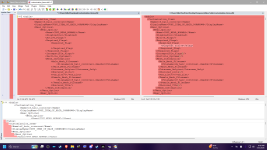

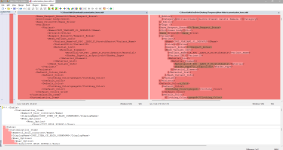


Based off of this AC post for SRTT, I was able to do it, but I don't have SRTTR right now installed to check.
The difference is that the relevant lines are 4193 and 4244.
Also it's crazy that the whole file is red, when it seems only difference is different amount of tab spacings. Usually it highlights differences in Yellow and Red is "missing"
The difference is that the relevant lines are 4193 and 4244.
Also it's crazy that the whole file is red, when it seems only difference is different amount of tab spacings. Usually it highlights differences in Yellow and Red is "missing"
Last edited: