
it's an oversight trivial to fix but i cant do it right nowI'm using the SuperUI file linked to on the Kobraworks website. It seems to have a bug that removes the eye colour option from character creation.

You are using an out of date browser. It may not display this or other websites correctly.
You should upgrade or use an alternative browser.
You should upgrade or use an alternative browser.
Saints Row 2 Juiced Patch
- Thread starter Soaa
- Start date


On the linked GitHub page, you scroll to the end of the post, down to here:I'm trying to download it, but I don't know how. The links here says to go to either the Kobraworks site or GitHub. Kobraworks takes me to GitHub, and I have no idea how to download it from there. I don't have a lot of experience with modding games.
And here's the instructions to install it
If you are using Steam, you can go to your Saints Row 2 Game Files folder through right-clicking it in the game's list:HOW TO INSTALL
Simply drag all of the contents in the zip file of the Juiced Patch version you just installed (besides readme.txt) into your Saints Row 2 Game Files, edit and configure juiced.ini, run your game. Its as simple as that.
(I don't have it installed on Steam, so it's pictured another game but steps are the same)
You'll know it's the right folder when it has "sr2_pc.exe" or "sr2_pc" in it
Then open SR2_JUICED.zip and copy/drag all the files in the folder as instructed and do the rest.
If the game does not launch / mod does not work you might need to install these (listed requirements on the website):
Microsoft Visual C++ 2010 Redistributable
Microsoft Visual C++ 2015 - 2022 Redistributable
Hope it helps!

Hello Guys,
Is not working for me too, i have installed Juiced Patch on the folder, and i checked with Mod Manager i can see them, but In game nothing change ...
I installed Microsoft Visual C++ too
Juiced Patch is compatible with Windows 11 ?
Thanks !
Is not working for me too, i have installed Juiced Patch on the folder, and i checked with Mod Manager i can see them, but In game nothing change ...
I installed Microsoft Visual C++ too
Juiced Patch is compatible with Windows 11 ?
Thanks !
Attachments
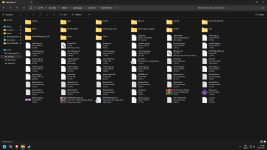
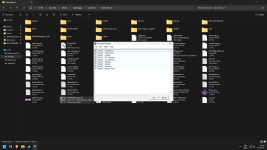

Uh. It looks like you downloaded the source and or parts of the source code and just threw it into your game and hoped for the best...? Thats not how it works. In the releases tab of github you will see a SR2_JUICED.zip you must download that. Usually its located in a tab called assets. You need to open that with a application such as winrar, 7z, any program that can open zip containers. Then extract that to your games root directory then boot the game and let it patch the exe. If it gets hung on a backscreen when patching, let it sit for around 30 seconds then exit and reboot and you should be good to go. The comment above yours tells you how to properly install Juiced. It works fine on windows 11.Hello Guys,
Is not working for me too, i have installed Juiced Patch on the folder, and i checked with Mod Manager i can see them, but In game nothing change ...
I installed Microsoft Visual C++ too
Juiced Patch is compatible with Windows 11 ?
Thanks !