
Widescreen issues with SRTT (Screen vigilante/"injured" tunnel vision effect)

I can't seem to find much mention of it myself, but is it a given that the "screen filter" UI elements aren't properly stretched across my screen? I've tried changing my screen resolution, and I absolutely poked around some LUA files and I am guessing it's a disgusting vint file?

Either way any help or word is appreciated, it's probably my only complaint about the Third, and coming from 1 and 2 I was ready to not like it.
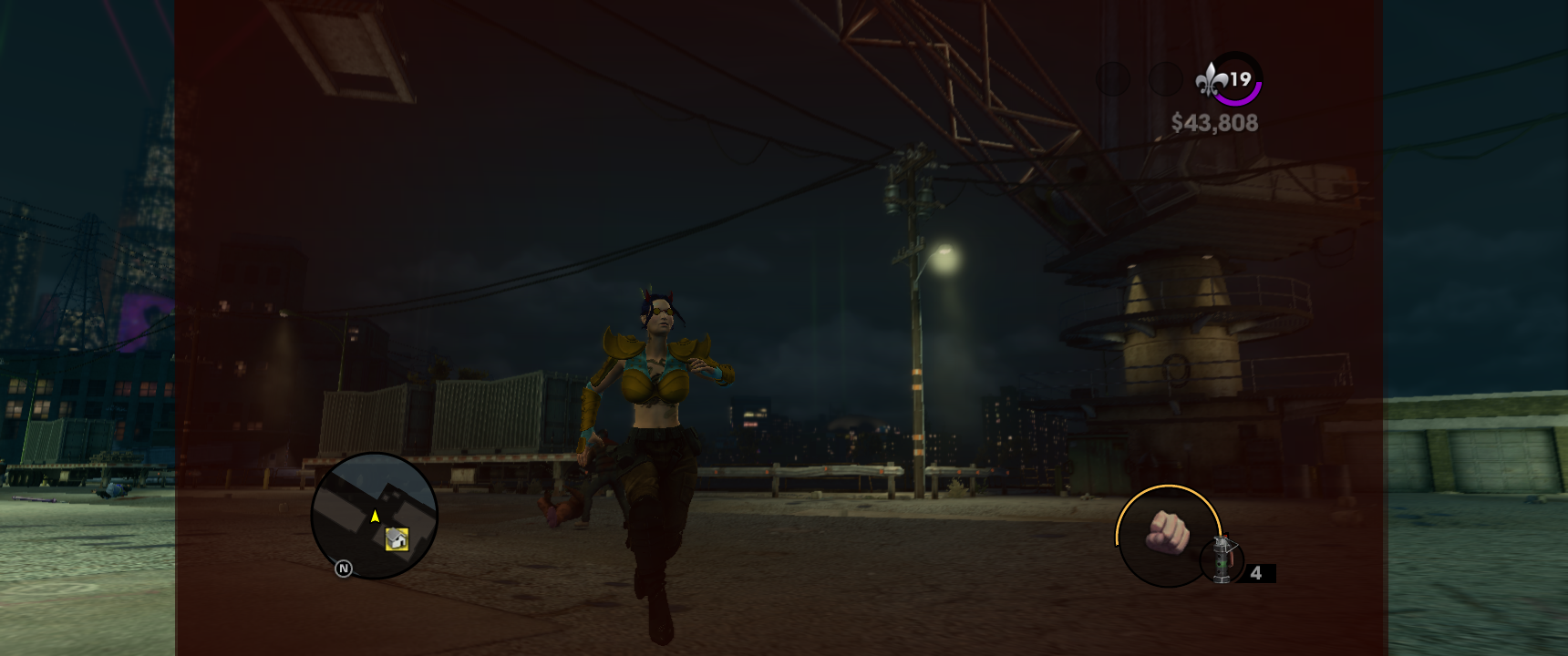
1782658776417.png
 
Does playing on regular 16:9 resolutions help it? And what mods do you have? (I don't have an ultrawide myself, so just prodding here.)
You helped me realize I should do a clean install before I jump to conclusions, I'll check it out after I get some sleep here. Oops-

My monitor is 3440x1440, and I have just a mod relating to editing the NPC behaviors to be more chaotic and varied, and I don't THINK I have any other mods installed aside from just that.


But, so far I've both tried nearly every resolution and there isn't much change. Although I want to make sure this isn't something I somehow screwed up by my own error before you waste more of your time trying to reason around this.


Will keep ya updated, apologies again!
 
Does playing on regular 16:9 resolutions help it? And what mods do you have? (I don't have an ultrawide myself, so just prodding here.)
1920x1200 makes the screen effect fill the screen, but the image is stretched across the width.
1920x1080 is better but still distracting with the stretch.
1720x720 screen effect doesn't fill,

etc etc etc

I set my resolution to 1600x900 or 1366x768, either one of these will probably do as the least warped ones for me, and now everything looks probably as good as it will get.

Although the second someone finds where these files are (for the vigilante) absolutely tell the world, it is way, way too strong for my liking.


I dug around a little in the forums but I still barely understand the HUD and vint crap. I don't understand why Volition couldn't have just made turning off the vignetting simple for ffs.

It might be the ugliest HUD effect I have ever seen.
 
I dug around a little in the forums but I still barely understand the HUD and vint crap. I don't understand why Volition couldn't have just made turning off the vignetting simple for ffs.

It might be the ugliest HUD effect I have ever seen.
I could try. Is it just the low health HUD effect or are there others? Might be easier to disable it through the texture side of things.
 
I could try. Is it just the low health HUD effect or are there others? Might be easier to disable it through the texture side of things.
If it was me, which I tried to look for the specific screen "filter" textures that include the "tunnel vision" (injured) texture, and the mission specific filters.

An example fo the filters are:

The (I think) pink filter that is used for the first "tutorial"/robbery mission in the game
The grain/film filter that is used for "faster, more intense" missions

And there are several that I'll have to go back and play through because there's a decent amount of them in the game, but I don't know if they're all kept together, or if they are specific to the mission (which would suck and that's why I don't care about the others more than the "injured" screen effect.


Thanks for the interest though, even if you don't find anything at least someone else will find this and go "Oh okay so I shouldn't waste my time right now".
 
Hardcoded a vignette scaling 'fix' for ultrawide and beyond,probably should make it like what I have in Juiced with a customizable file but see if this works before I push a fix, use MixFix from this attachment, instructions if you never installed it
It works! Thank you.
On both 16:9 (as in doesn't break the effect) and forced 21:9 1120 x 480 through custom resolution utility.
It didn't work when changing from 16:9 to 21:9 in-game, but no one would actually do that so it's not a problem.
i love asi files (not sarcasm - 1120x480).jpg


I did try messing with hud lua to disable it but apparently I'm doing something wrong and the asi fix looks decent enough to me
i love asm files.jpg
 
View attachment 50971
Hardcoded a vignette scaling 'fix' for ultrawide and beyond,probably should make it like what I have in Juiced with a customizable file but see if this works before I push a fix, use MixFix from this attachment, instructions if you never installed it
Okay, I gave it a try and I made sure MixFix was working (console was running and the ini generated fine) but when I go into 3440x1440 for example, there's no change. But if I go below say, 2024x847, those resolutions will fill the screen fine and are probably serviceable enough for me.

Although with the file provided I didn't see a change unfortunately, and I did make sure to use the ASI file here and not the one from the original downloads, so I want to say I installed everything correctly (everything is in the games directory).


Although I'm not set with my own answer as I could have done something wrong although I did attempt this on a clean backup, although maybe I should try again?
 
Back
Top