Saints Row 2 Juiced Coop help

So i've been trying to play coop with my boyfriend but we can't get neither online multiplayer or lan coop to work. Online just keeps loading and then says it was unable to find a game and lan coop works for a few minutes but then my boyfriend's game crashes. Singleplayer works fine for both of us.
(Sorry if this gets posted a lot, i could only find one similar post and it was from before SR2 Juiced patch even existed)
 
So i've been trying to play coop with my boyfriend but we can't get neither online multiplayer or lan coop to work. Online just keeps loading and then says it was unable to find a game and lan coop works for a few minutes but then my boyfriend's game crashes. Singleplayer works fine for both of us.
(Sorry if this gets posted a lot, i could only find one similar post and it was from before SR2 Juiced patch even existed)
Use a VPN like Tailscale or Radmin to bridge the connection between both PCs and join through Local.
 
Yeah, we're using radmin but the game crashes after a few minutes
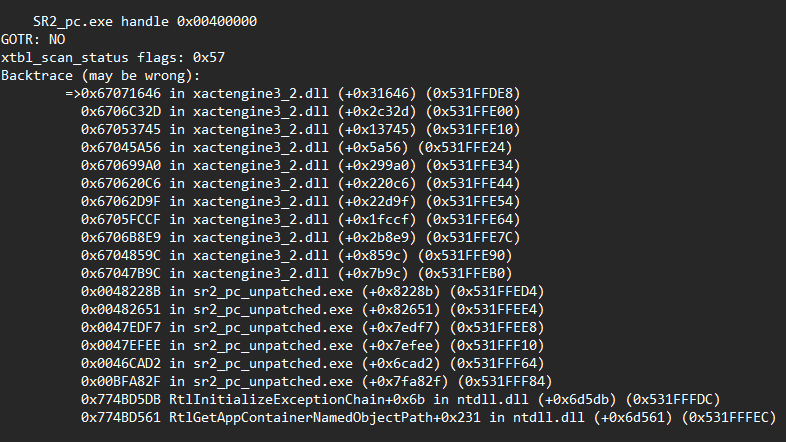
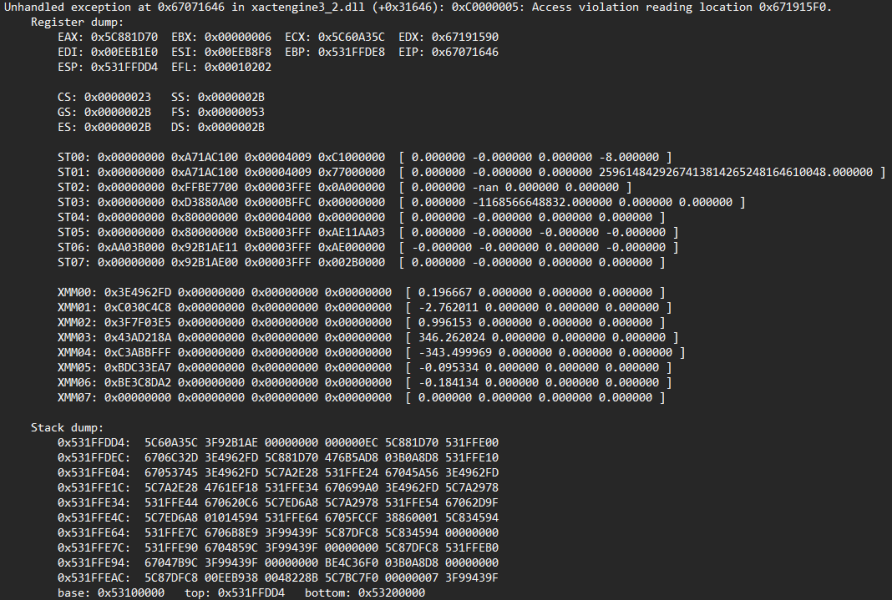
Edit: here's the crash report
 

Attachments

  • sr2_pc_unpatched.exe.20260126024106.log
    sr2_pc_unpatched.exe.20260126024106.log
    4.4 KB · Views: 56
  • imagem_2026-01-26_032532232.png
    imagem_2026-01-26_032532232.png
    55.4 KB · Views: 78
  • imagem_2026-01-26_032551016.png
    imagem_2026-01-26_032551016.png
    38.9 KB · Views: 80
It takes a few minutes to crash, and we both have the same install, we tried with GotR and without
ONLY if you're using Windows: One thing I would recommend is installing the 4GB patch: https://ntcore.com/4gb-patch/
And DXVK (x32 dinput8.dll or which other one is available): https://github.com/doitsujin/dxvk/releases

I doubt this will fix it, but it's better to be safe.

Edit 01: This almost always fixes the memory issues, I am not entirely sure what is happening here since I have no clue how to decode the crash logs that come from JuicedPatch, but Saints Row 2 is always guaranteed to crash no matter what mods you use to fix it.
Edit 02: This is an audio issue, either the playback device isn't being registered by the game or it is trying to play a sound that is null.
 
Last edited:
It takes a few minutes to crash, and we both have the same install, we tried with GotR and without
If using Linux with Proton:
  • Open Protontricks and select Saints Row 2
  • Select install an application, then select Install a Windows DLL or Component
  • From the menu, select and install xact and xact_x64
  • Exit Protontricks
There's always another method: Openspy. I know nothing about it since I don't use it, but I heard it's the best way to play online. Though, JuicedPatch uses the same DLL so be careful with that if you think this is your final option; Just traditional GOTR and Openspy could allow for stable play if this doesn't work.
 
Last edited:
Back
Top