
Removing all clothing and then applying the jacket doesn't crash is true, I just tested it, maybe it has something to do with the ronin jacket having more polygons?To repeat: Use the "Edit" button in the bottom left corner of your previous post. Don't double-post. It's annoying.
You'll have to be more specific about what caused that particular crash. Eg: Did it happen when switching menus?
This issue is known about and there are workarounds.

You are using an out of date browser. It may not display this or other websites correctly.
You should upgrade or use an alternative browser.
You should upgrade or use an alternative browser.
Made 2 Measure: Seabound's Clothing Patch
- Thread starter -SeaboundSaint-
- Start date

Probably. I explained everything in the post I linked you to. It happens when the game tries to apply a Ronin Jacket mesh and switch an Overshirt's mesh at the exact same time. The game can't handle it, likely due to the memory expense of the Ronin Jackets. Applying both meshes simultaneously is too big of an operation. Allocating more memory to the "coats" Slot via customization_slots.xtbl does not fix the issue.Removing all clothing and then applying the jacket doesn't crash is true, I just tested it, maybe it has something to do with the ronin jacket having more polygons?
Nope:
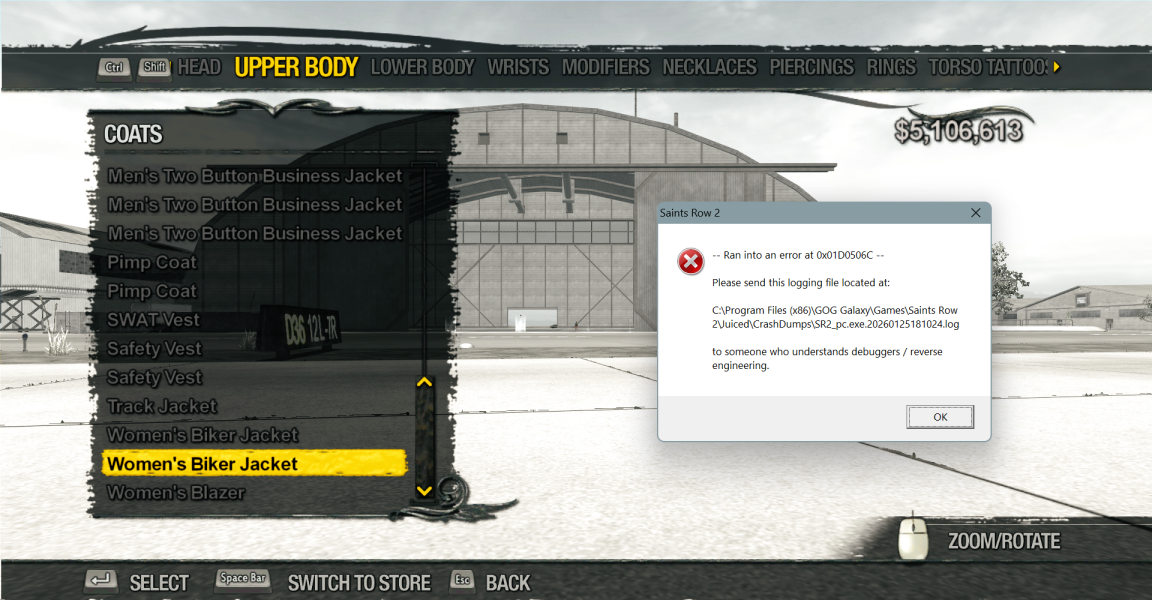
Last edited:

The previous method worked for me, as I applied the undershirt's jacket state before applying the Jacket. I don't think it has anything to do with the polygons of the jacket, I think the jacket just doesn't properly apply the state causing the game to crash as Volition probably never added anything to safeguard this or validate whether or not this is applied. It is also one not a coat added by Volition and intended to only be used for NPCs so maybe that has something to do with it.Probably. I explained everything in the post I linked you to. It happens when the game tries to apply a Ronin Jacket mesh and switch an Overshirt's mesh at the exact same time. The game can't handle it, likely due to the memory expense of the Ronin Jackets. Applying both meshes simultaneously is too big of an operation. Allocating more memory to the "coats" Slot via customization_slots.xtbl does not fix the issue.
Edit: I just had a fun thought... I wonder if it would work if the camera were zoomed away far enough that it would be loading the LODs instead?...
Nope:
View attachment 47399
Maybe you're right. But those Ronin Jackets require literally double the memory allocation to the "coats" Slot than other Coats in order to render.The previous method worked for me, as I applied the undershirt's jacket state before applying the Jacket. I don't think it has anything to do with the polygons of the jacket, I think the jacket just doesn't properly apply the state causing the game to crash as Volition probably never added anything to safeguard this or validate whether or not this is applied. It is also one not a coat added by Volition and intended to only be used for NPCs so maybe that has something to do with it.
Dismantling the combination of Flags which cause the Overshirt to switch to the Flat mesh doesn't cause an issue, because only one mesh is being applied instead of two at the exact same time. When clothing Slots are loaded onto your character, they are staggered so they load in three stages. Stage one might be Undershirts. Stage two might be Overshirts. Stage three might be Coats. This is done for stability via customization_slots.xtbl. When a Flat mesh of an Overshirt is forced by any other Coat, they can both load simultaneously. But when Ronin Jackets force a Flat mesh of an Overshirt, they cannot both load at the same time, but they probably would be able to if they were staggered. It's just that they aren't staggered due to the nature of how those Flags work.
It's also worth noting that the issue only occurs with a couple of Overshirts.
Makes sense. So it requires double the memory to apply the coat alongside having to switch the state of the overshirt causes the game to crash because not enough memory is allocated to do all this at once, am I getting that right?Maybe you're right. But those Ronin Jackets require literally double the memory allocation to the "coats" Slot than other Coats in order to render.
Dismantling the combination of Flags which cause the Overshirt to switch to the Flat mesh doesn't cause an issue, because only one mesh is being applied instead of two at the exact same time. When clothing Slots are loaded onto your character, they are staggered so they load in three stages. Stage one might be Undershirts. Stage two might be Overshirts. Stage three might be Coats. This is done for stability via customization_slots.xtbl. When a Flat mesh of an Overshirt is forced by any other Coat, they can both load simultaneously. But when Ronin Jackets force a Flat mesh of an Overshirt, they cannot both load at the same time, but they probably would be able to if they were staggered. It's just that they aren't staggered due to the nature of how those Flags work.
It's also worth noting that the issue only occurs with a couple of Overshirts.
Pretty much. But to be clear, when I'm talking about memory allocation, I'm talking about increasing the maximum mesh loading capacity of the clothing Slots via customization_slots.xtbl. Increasing that capacity has no effect on this bug. It just allows the Ronin Jackets to be rendered in that Slot. I don't know why the game can't handle applying both meshes at once. I guess it's an engine limitation. But it could be something else for all I know.Makes sense. So it requires double the memory to apply the coat alongside having to switch the state of the overshirt causes the game to crash because not enough memory is allocated to do all this at once, am I getting that right?
Also, just to add; When you're previewing another Slot (like Belts), Undershirts, Overshirts and Coats are hidden so you can see what you're doing. When you move to preview a different Slot, they'll reappear. In this instance, those Slots are hidden, not unloaded. The crash would not occur when the Overshirt and Ronin Coat reappear simultaneously. This proves the issue is to do with loading the assets, not rendering them.
Honestly? I don't think the allocation variables for each item does anything or much at all. I messed around with it in Saints Row 4 and in Saints Row 2 and neither really did anything. I could be wrong though, they could be for a special reason.Pretty much. But to be clear, when I'm talking about memory allocation, I'm talking about increasing the maximum mesh loading capacity of the clothing Slots via customization_slots.xtbl. Increasing that capacity has no effect on this bug. It just allows the Ronin Jackets to be rendered in that Slot. I don't know why the game can't handle applying both meshes at once. I guess it's an engine limitation. But it could be something else for all I know.
Also, just to add; When you're previewing another Slot (like Belts), Undershirts, Overshirts and Coats are hidden so you can see what you're doing. When you move to preview a different Slot, they'll reappear. In this instance, those Slots are hidden, not unloaded. The crash would not occur when the Overshirt and Ronin Coat reappear simultaneously. This proves the issue is to do with loading the assets, not rendering them.
I assure you they do work. The additional Slots in M2M would not be possible if they didn't work.Honestly? I don't think the allocation variables for each item does anything or much at all. I messed around with it in Saints Row 4 and in Saints Row 2 and neither really did anything. I could be wrong though, they could be for a special reason.
The PC port uses
<PS3_CPU_Size> and <PS3_GPU_Size>. I imagine the others are for Xbox 360.Btw;
<Render_Order> is what I was referring to here:Edit: It turns out Overshirts and Coats both use the same Render_Order (3). So there goes that theory, I guess.When clothing Slots are loaded onto your character, they are staggered so they load in three stages.
Last edited:
Interesting. I would have thought all of this would be automated, but I guess Saints Row's engine has always been strange. It's cool to see the little things behind the scenes. I have to say though, this game already had the best customization in the series but M2M makes it a lot more impressive.I assure you they do work. The additional Slots in M2M would not be possible if they didn't work.
The PC port uses<PS3_CPU_Size>and<PS3_GPU_Size>. I imagine the others are for Xbox 360.
Btw;<Render_Order>is what I was referring to here: