
Change Player Height Cheat Table

Only for the legacy_stable version of Steam and GOG exes! RE-ELECTED/EPIC GAMES VERSION NOT SUPPORTED!!!
Also co-op unsupported
(though in that case getting stomped + edit character_definition.xtbl works).
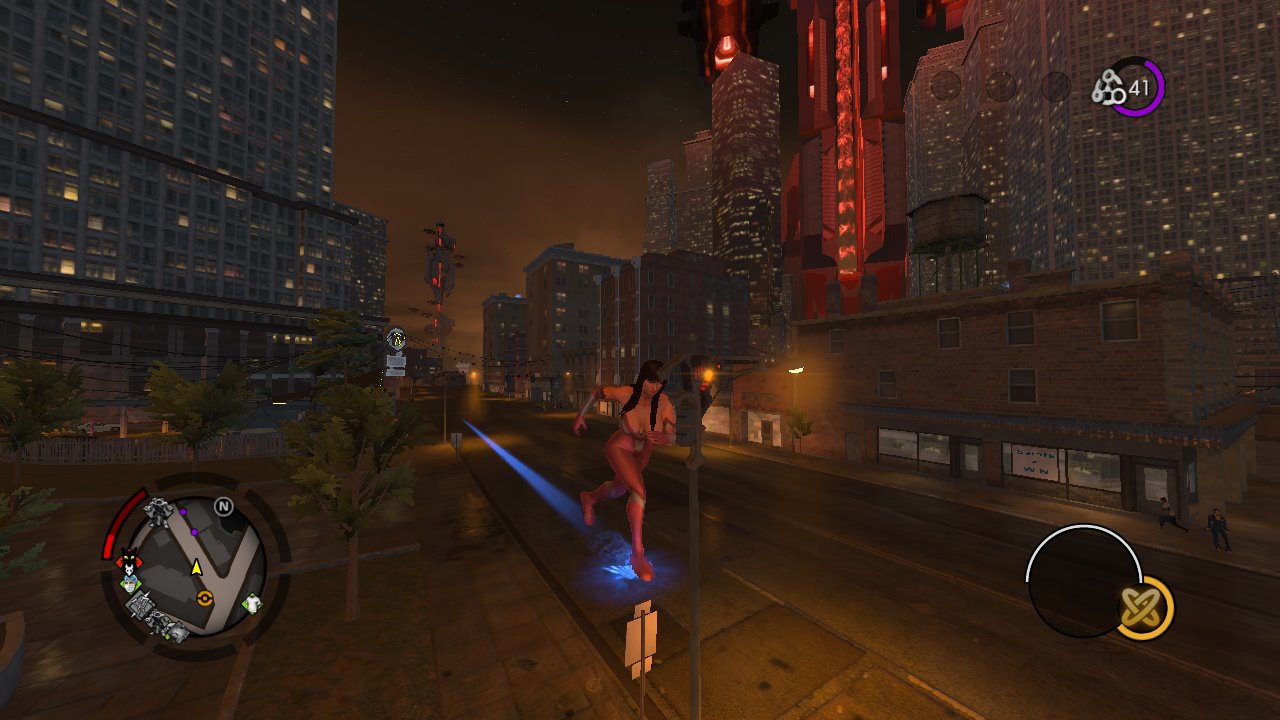
sr4verybig.jpg


Now you can be 6'1 ft tall (or 600'1 ft for that matter) without accidentally imploding people when touching them!
Other arguably less exciting benefits:
  • landing no longer causes a 'thicc' stomp effect
  • super sprint works (previously you would just have weird animations)
  • you can play Insurance Fraud fine (not sure if this was a problem before, but I certainly had fun)
  • allows you to define player height in character_definitions.xtbl (to my knowledge, 1.0 is 6ft)
  • sprinting/jumping upgrades scale with your size (if you don't buy any upgrades nothing will happen)
In SR3/SR3R, to change anyone's height including the player (StyleTest_PC / _MP2), you'd just extract misc_tables.vpp_pc, edit character_definitions.xtbl in the <Height> tags and voila!

In this game, if you do that, you get an unceremonious gradual shrink to 1.0.
I have not found a way to fix this with .xtbl / .lua file editing, so I made this table.

Unfortunately, the walking and jogging speed (aka not sprinting) will be out of sync (e.g. slower than it should be if you're bigger).
This is probably fixable, but for now I don't see it as a priority.
Also, if you are big enough, things that change the camera FOV also get affected - killing Command CIDs at very large sizes will cause FOV to turn into a negative value, which might cause dizziness (it's not pleasant).

Things still need to be done (unlikely)
  • Re-enable jump and sprint when in "giant mode"
  • Possibly serparate giant effects on gameplay

How To Use the Cheat Table?


0. If you don't already have it, Download Cheat Engine from cheatengine.org (I have no idea what the heck "Runtime Modifier" is.)
May contain adware, READ each step and make sure to press Decline the ones you don't want.
If you are scared of viruses/AV warnings, ensure the HTTPS is working properly by clicking the lock > more info.
I have used CE for years and still haven't gotten a Nigerian Prince email asking me to open a bank account, so I'm sure it's a fine program.

1781702992920.png

  1. Open Cheat Engine and the game (let it sit at main menu).
  2. Press the Magnifying glass icon on the top left (the one that glows)
    1781703452162.png
    and pick the process
    1781707536675.png
  3. Press the
    1781704067830.png
    folder icon beside the magnifying glass and find where you extracted the folder (right-click > extract with 7-zip if you haven't already). Open the correct one for your game version (Steam (SaintsRowIV.CT) or GOG (Saints Row IV.ct)).
  4. Ensure the bottom window has stuff, and click on the box to activate the script (the contents may slightly differ - GOG version has more stuff than just height)

    1781704067860.png

    The box should now look like this:
    1781704139443.png
  5. Start/load the game file. If you have already set height in character_definitions.xtbl, it will appear properly like in SR3.
  6. If you wish to change the height, change the "actual height", not the shrink target (default size) as it sets giant/not giant stuff.
  7. Enjoy life being slightly taller than the game allows (or being shorter, if you so wish)
You can simplify the open file process by placing the .ct file in Documents > My Cheat Tables, it should then ask if you want to load the associated file.

This issue is likely caused by the shrink gun implementation.

SRIV has two "height" values in the code; the "current" height and the "default" height (aka height target). The height target can be changed through LUA commands like player_change_default_size(LOCAL_PLAYER, 2.0, false) or character_set_giant(LOCAL_PLAYER, true) .
Maybe there is some combination of these that prevent the stomp/touch of death effect, but I am unaware of it.

These are the contents of the script change for the two exes in the table:

Steam version:
XML:
    <CheatEntry>
      <ID>4</ID>
      <Description>"stop height change (can enable in main menu)"</Description>
      <VariableType>Auto Assembler Script</VariableType>
      <AssemblerScript>[ENABLE]
//code from here to '[DISABLE]' will be used to enable the cheat
SaintsRowIV.exe+2C4510:
je SaintsRowIV.exe+2C464F

 
[DISABLE]
//code from here till the end of the code will be used to disable the cheat
SaintsRowIV.exe+2C4510:
jne SaintsRowIV.exe+2C464F

</AssemblerScript>
    </CheatEntry>

GOG version:
XML:
    <CheatEntry>
      <ID>1</ID>
      <Description>"script - stop height be gone (freeze before changing size to prevent giant effect)"</Description>
      <VariableType>Auto Assembler Script</VariableType>
      <AssemblerScript>[ENABLE]
//code from here to '[DISABLE]' will be used to enable the cheat
Saints Row IV.exe+2C3CD0:
je "Saints Row IV.exe"+2C3E0F


[DISABLE]
//code from here till the end of the code will be used to disable the cheat
Saints Row IV.exe+2C3CD0:
jne "Saints Row IV.exe"+2C3E0F

</AssemblerScript>
    </CheatEntry>

They are located by checking "what accesses" of "current" height value (which can be discovered by setting in character_definitions.xtbl a size like 10, search for Float Decreased Values multiple times (pause and unpause), when reach 1 do a search for 1.0000000 (have trailing zeroes so Cheat Engine atleast bothers to find that number).
Then do all the stuff to create a single pointer version of this (enable the VEH debugger in settings).
Find what accesses the "actual height". Check each's More Information and see which one looks like this:
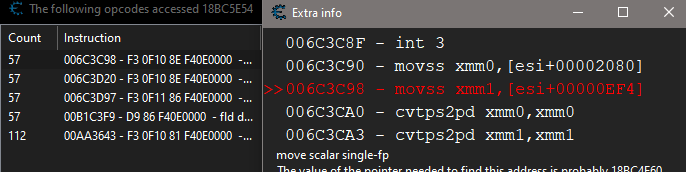
1781707023985.png

Then scroll down a bit and find the jne and turn it into a je*. If the game doesn't crash, copy address + intruction, press Ctrl + A, press Ctrl + Alt + T to template, paste and format as above (add linebreak, a double dot : , "blah blah you get idea"- a certain Teriyaki)
finally file > add to cheat table and save the dang table if ya habent already.

*I have no idea what this function does.

These instructions kinda suck for a casual user, but I assume if you are interested in how find this you should have already completed Step 7 (seven) of the Cheat Engine tutorial anyway and can understand abstract things like how computer programs work. Who needs puzzle games when you have Cheat Engine? /sarcasm

As for the upgrade speeds (GOG version only because I like it more), according to upgrades.xtbl each ubgrade is 0.33, 0.67, 1.00 respectively. Float search for range of 0.000, buy upgrade, then 0.33, buy upgrade, then 0.67, buy upgrade, 1.00.

I'm sure you can figure out the settings stuff
 

Attachments

Last edited:
Finally after numerous years, someone made and shared a height mod that works and doesn't break anything. I have tried to fix it myself using so many methods, the regular character_definitions, using character_set_giant (LOCAL_PLAYER, true) which while this stopped the shrinking, my character was in the ai floating and all powers, attacks, weapons, were broken you could just move weirdly but that was it. I tried messing around with the additional cheats xtbl and the giant player cheat to try and see if I could change values that way, tried with cheat engine myself but had no idea what lines/what to look for, etc. If you don't mind sharing, could you please let me know how you were able to create the script? Because this was something I always wanted to do from time to time throughout the years, but had no idea what to do/how to start and because this community is pretty dead at this point, there was no help or tutorials I could find.
 
Last edited:
Also would you please tell me what you did to remove the death from above effects upon landing from superjumps? I actually liked that part that got "broken" with height increase mods, but have no idea where and what to change for that effect to apply and if it's possible to only trigger at certain heights as a passive power landing type of move. Could you please help me with that? And where do you edit the sprint hitbox so it registered with bigger sizes? As well as removing the exploding npcs and massive amount of mass? I am trying to mess around with these myself for my own ideas, but have no idea where these properties are located. What packfile and xtbl? Or can it not be found/done there?
 
If you don't mind sharing, could you please let me know how you were able to create the script?
Yay, someone expressed interest!

A rough idea of the how to is in the Technical Info spoiler, directly above the attachments section (purple button). I'll see about making those steps clearer since it was pretty late when I posted this lol.
Thank you for caring <3
 
where and what to change for that effect to apply and if it's possible to only trigger at certain heights as a passive power landing type of move
I don't know yet either - the script just changes one line which stops the game from recognizing that the player's size has changed / is bigger than 1. If you change the target height to 1.5 , the actual height to 0.9, then tick the script, you get the giant DFA effects when landing even though you're smaller than you're supposed to be.
Same goes for the "touch people/cars and they die" effect - all part of the same script checking for the height change.

I could try looking into it myself, but it might be harder and take a while
 
Yay, someone expressed interest!

A rough idea of the how to is in the Technical Info spoiler, directly above the attachments section (purple button). I'll see about making those steps clearer since it was pretty late when I posted this lol.
Thank you for caring <3
Of course, no problem! I checked it out, it definitely looks interesting, I would have to learn cheat engine for it since I have just used it for basic inventory/health/stamina etc. table mods in the past and by just ticking boxes, not actually finding and changing the values myself. Is there a particular reason as to why the description line is different depending on the steam or gog version? Were those like that when you found them or did you change them? Another question, what do you mean by upgrade speeds? Upgrading what the super sprint speed or something else? Is there reason why it's gog only because it is from what I heard more stable and you play on that version or is there some limitation on the steam version? (I play on the steam version) Also, as a token of appreciation, since you made a mod I wanted for the longest time, I could also share my own melee overhaul mod that I have made and keep trying to expand on. I don't know if you have already done this for yourself, if not let me know if you would like the mod but essentially here are the changes:

So you get tired of the same basic melee combat in the game right? where the first 2 attacks are always the jab and hook followed by one of the 4 finishers right? Well this mod makes it so that any 11 animations can play randomly at any point in the attack chain. This means that the finishers are no longer restricted to only the last attack, as well as the base jab and hook can play in any order, plus more. The moves so far are: the jab, the hook, the front kick, the sidekick, the superman punch, the windup haymaker, the freeze break attack haymaker punch which is a fully working move that was limited to only the freeze shatter attack, the ground stomp which now can play in the attack chain and it still connects and works on npcs and cars, and 3 restored moves that for some reason were cut from the game, those being: the gut punch, the elbow (not the directional one), and the knee. There is also this spinning backfist animation but I can't get that one to play for some reason, that one is another cut animation that I know for sure works since I was inspired by the SR 3 melee overhaul mod which also worked for Saints Row 4, and in that one the spinning backfist worked. Essentially the possibility space has been expanded from 4 sequence of attacks that can play to a whopping 1,331.

This isn't all though. I have also restored the epic beatdown animation that was artificially restricted as the fight club finisher move, I have bound the animation to play both on super sprint as a random choice, as well as on the r3 "kick" attack button. So more variety and when a move can trigger is always nice, though if you want a guaranteed version for the animation to play on command instead of randomly, I can also do that by removing the gut punch and soccer kick entries. I can also add it to the regular sprint as a possible finisher for more variety in that pool as well if you want, I just didn't do it because it "makes more sense" and looks more epic when activated from super sprint. Also keep in mind that you must be facing an npc for the animation to trigger, it's not a backwards facing npc one. Still trying to figure out how to fix the audio for it and if it's possible to add blood effects to it.

Finally, I also made it so that the human shield toss (without needing to go into human shield stance first), neck snap, the cut vampire bite execution, and for goofiness, the anal probe animation can also play which without a weapon looks kind of wonky but hilarious to see an npc die by having a fist shoved up their ass. These are triggered when facing the back of the npc (the anal probe one also has a front variant that I added that flips the npc to their back and then does it) and pressing r3 and one of these including the base soccer kick plays randomly, I have also added these as options that can play from super sprint and regular sprint (including the base game gut punch and soccer kick), though for the super sprint the npcs can glide towards you for the synced animation even if you trigger it from a far which actually in a strange way looks good in its own way. The only problem with these is that if you trigger the toss move from super sprint or regular sprint the npcs a lot of the time land on their feet and survive, I don't know why and I am trying to fix that, also you barely throw the npcs with this custom toss version, still trying to figure that one out. Also I changed the r3 attack for the air/vehicle version that plays the separate weak front kick animation to the more powerful looking front kick finisher. There are actually 2 different entries that can play 2 completely different animations but because in the vanilla game both are set to the same animation, you think there is only one attack. Depending on whether your character is moving or not (and by moving it means any slight amount even when the character is playing that little stopping animation), will trigger a different animation, so I attached the powerful looking front kick one to the moving version and the freeze break haymaker to the standing version. Though you can swap these to play any of the animations I previously mentioned as well as the diagonal attack ones. The entry names are unarmed_kick for the standing one and unarmed_move_kick for the moving one if you later want to change these.

Oh and the cherry on top in addition to all of this? The attacks have all been changed to have an impact force of 40 (base game being 15 and 10) meaning attacks now launch npcs down the street and cars are also affected as well, which not only matches the gameplay and theme of the game but it also makes visual sense, because if the boss can trigger an earthquake by stomping, then the basic attacks barely moving npcs and cars feels disconnected from that idea. I also increased the impact force of the human shield toss (the vanilla version not the custom version toss only one I made, for that one it doesn't work still trying to figure that out) so that you can throw npcs down the entire street. With these impact changes, you truly get to see some spectacular and brutal ragdolls and collisions that you never would have been able to otherwise.

This mod is best enjoyed in addition to the NPC behavior and spawn mod for more varied and aggressive enemies, stronger npcs that don't die from one hit and mini boss fight type npcs that spawn randomly, which take a while to kill and offer a bit of a challenge if not playing with invincibility. So if you are interested, let me know and I will share it.
 
Last edited:
I don't know yet either - the script just changes one line which stops the game from recognizing that the player's size has changed / is bigger than 1. If you change the target height to 1.5 , the actual height to 0.9, then tick the script, you get the giant DFA effects when landing even though you're smaller than you're supposed to be.
Same goes for the "touch people/cars and they die" effect - all part of the same script checking for the height change.

I could try looking into it myself, but it might be harder and take a while
Interesting, I tried it with 1.2 and 0.9 as the current height and yeah super sprint doesn't work, and the dfa effects and mass effect (no pun intended although fully intended) also apply. What's interesting to me is that when you change the height using sandbox+ or the things to do in the dominatrix version to lower than 1, you still get to keep super sprint effects and the dfa and mass effects don't apply but that leads to a weird state because if the actual height being bigger than 1 is what triggers the dfa/mass effects, then that means that the sandbox plus version is using the target/actual height for the changes not the current one which survives that shrink script. Perhaps because it wasn't known or able to be changed at that time? Interesting enough the character_set_giant(LOCAL_PLAYER, true) command must be targeting the current height since that stops the shrinking but it also breaks everything, which is from what I assume because it only changes it visually but all the hitboxes remain the same which is why you float in the air and any melee attack, power, or weapons don't work. So is the script you made, targeting the same "current height" entry the character_set_giant(LOCAL_PLAYER, true) is targeting? Because if so how come it works normally and isn't broken unlike that command change? Is it because the command change affects both the current and actual height entries? But even then that wouldn't explain it since if I set both current and actual height to the same amount using the script you made, the game is still playable unlike the fully broken state of character_set_giant(LOCAL_PLAYER, true) which makes you float in the air, it just removes super sprint, and applies those dfa/mass effects.
 
Oh boy a long post! : D
Is there a particular reason as to why the description line is line depending on the steam or gog version?
They have different code (oversimplifying it). This is also why My Steelport Emulator doesn't work with it.
Another question, what do you mean by upgrade speeds? Upgrading what the super sprint speed or something else?
Yes.
From unlockables.xtbl:
<Name>Sprint_Speed_1</Name>
<Type>
<Superpower_Level>
<superpower>sprint</superpower>
<level>0.33</level>
</Superpower_Level>
</Type>

<Name>Sprint_Speed_2</Name>
<Type>
<Superpower_Level>
<superpower>sprint</superpower>
<level>0.67</level>
</Superpower_Level>
<value_name></value_name>
<scaler>0.0</scaler>
</Type>

<Name>Sprint_Speed_3</Name>
<Type>
<Superpower_Level>
<superpower>sprint</superpower>
<level>1</level>
</Superpower_Level>
</Type>

Knowing these, I just had to assume that the <level> was at 0.00 float value when the player hadn't purchased any upgrades.
So you'd do a float search of 0.00, buy sprint level 1, search for 0.33, buy level 2, search for 0.67, buy level 3, search for 1.00, then try changing the first non-green value.
As for creating a pointer so the cheat table always has the correct address, well, that's what the Cheat Engine tutorial in the help menu is for! Dark Byte has video tutorials for that on youtube as well. Don't rush through it and you should eventually understand enough concepts to make your own cheat tables (although it will feel less quick than you might like)

Of course, you could also mod unlockables.xtbl to change the powers' respective <level> tags (I read it from Fan of Saints' post). Editing that file is a much easier way to do it.
Is there reason why it's gog only because it is from what I heard more stable and you play on that version or is there some limitation on the steam version? (I play on the steam version)
I just like not dealing with Steam's DRM, especially now that SteamWebHelper is mandatory and takes up valuable RAM space. With the GOG version has some bugs, it's way easier since I can just pin it to start menu and have it launch faster since Steam isn't part of the process.
I could make the versions identical but it would require spending time for a version that I like less.

So is the script you made, targeting the same "current height" entry the character_set_giant(LOCAL_PLAYER, true) is targeting? Because if so how come it works normally and isn't broken unlike that command change?
If I'm understanding correctly, no.
It might help to think of the script to make it work like how height changes work in SR3 - you edit StyleTest_PC height in character_definitions.xtbl and that's pretty much it, the shrinking stuff only happens in SR4. The cheat engine script disables the shrinking stuff.
So even if you change the "target height" that the game normally shrinks to, it won't have an effect if the script is ticked.


That mod sounds sick by the way! I'm not experienced with melee.xtbl, so I'd love to try it (although I don't use shitface's mod, so I'll probably want to make some edits of my own).
You could DM it to me of course, although I think it would be cooler if you posted it as a mod release so there's a public archive of it anyone can access. But if you feel it isn't ready yet I understand.
 
Last edited:
They have different code (oversimplifying it). This is also why My Steelport Emulator doesn't work with it.
Wait what? I use My Steelport Emulator and it works or do you mean it doesn't work on the gog version?
Yes.
From unlockables.xtbl:

<Name>Sprint_Speed_1</Name>
<Type>
<Superpower_Level>
<superpower>sprint</superpower>
<level>0.33</level>
</Superpower_Level>
</Type>

<Name>Sprint_Speed_2</Name>
<Type>
<Superpower_Level>
<superpower>sprint</superpower>
<level>0.67</level>
</Superpower_Level>
<value_name></value_name>
<scaler>0.0</scaler>
</Type>

<Name>Sprint_Speed_3</Name>
<Type>
<Superpower_Level>
<superpower>sprint</superpower>
<level>1</level>
</Superpower_Level>
</Type>

Knowing these, I just had to assume that the <level> was at 0.00 float value when the player hadn't purchased any upgrades.
So you'd do a float search of 0.00, buy sprint level 1, search for 0.33, buy level 2, search for 0.67, buy level 3, search for 1.00, then try changing the first non-green value.
As for creating a pointer so the cheat table always has the correct address, well, that's what the Cheat Engine tutorial in the help menu is for! Dark Byte has video tutorials for that on youtube as well. Don't rush through it and you should eventually understand enough concepts to make your own cheat tables (although it will feel less quick than you might like)

Of course, you could also mod unlockables.xtbl to change the powers' respective <level> tags (I read it from Fan of Saints' post). Editing that file is a much easier way to do it.
Yeah the numerical increases makes sense and since 0.33 is the difference per level then the base has to be 0 or close to it and unlockables xtbl is indeed a much easier and faster way to change these speeds. I haven't checked out any tutorials besides one time and halfway through the video realized it wasn't what I was trying to do at the moment. I will check them them out for sure. The mystery behind it is intriguing.
I just like not dealing with Steam's DRM, especially now that SteamWebHelper is mandatory and takes up valuable RAM space. With the GOG version has some bugs, it's way easier since I can just pin it to start menu and have it launch faster since Steam isn't part of the process.
I could make the versions identical but it would require spending time for a version that I like less.
What exactly is the problem with Steam's DRM? Do you get problems if you try to add your gog copy as a non steam game? It should work fine, or does it have to do with something else? Also how was Steam before SteamWebHelper? I wasn't gaming on pc before they introduced it so don't know what the differences are and in what aspects it's better or worse?

If I'm understanding correctly, no.
It might help to think of the script to make it work like how height changes work in SR3 - you edit StyleTest_PC height in character_definitions.xtbl and that's pretty much it, the shrinking stuff only happens in SR4. The cheat engine script disables the shrinking stuff.
So even if you change the "target height" that the game normally shrinks to, it won't have an effect if the script is ticked.
Interesting, then I wonder what makes it that the character_set_giant(LOCAL_PLAYER, true) command completely breaks movement, weapons, powers, etc. because this command also stops the shrinking but during the process clearly something breaks, perhaps hitbox values but even then that would just disable super sprint not make you float in the air. I do also remember how in Saints Row 3, the Style_Test_PC entry in character_definitions worked perfectly fine, I wondered why they added the shrinking effect for this game considering that they were built on the same engine, maybe due to the powers, there could have been glitches or just for "safety" I guess. Also I changed the target height higher than 1 the one that says (height target for giant stuff) correct?, without changing the height actualmente one and then checking the stop height change box but nothing changed, so not sure what you mean about that part, it works when changing the height actualmente value to higher than 1 with or without also changing target height (with changing target height you get the dfa/mass effects, without it is exactly how the game is but you are able to be bigger), but the inverse doesn't apply.

That mod sounds sick by the way! I'm not experienced with melee.xtbl, so I'd love to try it (although I don't use shitface's mod, so I'll probably want to make some edits of my own).
You could DM it to me of course, although I think it would be cooler if you posted it as a mod release so there's a public archive of it anyone can access. But if you feel it isn't ready yet I understand.
I just posted it under the animations subforum, do check it out and let me know what you think! Also what kind of edits do you mean? Such as making the npcs be able to take more damage?
 
do you mean it doesn't work on the gog version?
Yeah it doesn't work on the GOG version. admittedly could have worded that part better.

What exactly is the problem with Steam's DRM? Do you get problems if you try to add your gog copy as a non steam game? It should work fine, or does it have to do with something else? Also how was Steam before SteamWebHelper? I wasn't gaming on pc before they introduced it so don't know what the differences are and in what aspects it's better or worse?
Yeah there's no problem adding it as a non-steam game.
The problem is mostly the memory and and also the processing usage. Where I live PC parts are a bit of a luxury, especially once you step past the world of used/refurbished enterprise Thinkpads and ThinkCentres. Around a decade ago I did most of my computer stuff on one of those baseline laptops. - it somehow had both a mechanical HDD and a mere 4GB of RAM with Windows 10 Pro. This sucked, and at the time just having Steam opened took 200MB (it now takes 500MB, though I have more RAM since then). Windows 10 by default took 2GB+.

I later discovered GOG and saw it was a way to pay for game installers in the same way that I did with Steam, with none of the optimization headaches I had to do just to play games. I seldom use multiplayer/social features so it was just better overall. Being able to transport the games across computers without having to install Steam first was great.

If you like Steam's way of launching games and use its features, more power to you, but I prefer the old fashioned "double click the .exe and it just runs". Sometimes I do miss Steam Workshop for SRIV but thankfully some people also mirror their mods from the workshop to this site.

I wondered why they added the shrinking effect for this game considering that they were built on the same engine, maybe due to the powers, there could have been glitches or just for "safety" I guess.
As Voliton's Knobby said in a Ask Voliton! thread:
Ok, I checked in the code and it looks like giants and shrink ray stuff was added to SR4. Also, code was added to slowly bring you back to "normal" size. This seems to be hard coded to 1.0. :( I'll see about somehow exposing this to lua or something. In the mean time, you can prevent the processing by flagging the character as a giant, which can be done with the lua function character_set_giant.
Sadly, Voliton never had time to push such an update to fix that function.

Also I changed the target height higher than 1 the one that says (height target for giant stuff) correct?, without changing the height actualmente one and then checking the stop height change box but nothing changed, so not sure what you mean about that part, it works when changing the height actualmente value to higher than 1 with or without also changing target height (with changing target height you get the dfa/mass effects, without it is exactly how the game is but you are able to be bigger), but the inverse doesn't apply.
Yeah... I eventually hope to understand it more and put better notes, but don't expect it too soon. It takes both free time and patience to try and do these stuff especially as the game keeps crashing whenever I change a wrong part of the code (a lot of these work are blind guesses).

Also what kind of edits do you mean? Such as making the npcs be able to take more damage?
Well, close, I actually want to make the knockback effect less as it's pretty unengaging to do a three-hit combo, have the enemy get knocked across the road, super sprint to them and hope the tornado thing doesn't knock them even further and then punch them again. Setting the knockback force to 3 seems to solve this problem for me.
Also I'm not a big fan of the anal probe so I'll probably remove it from the possible string of attacks (but if you want to tell me how to do it that would be nice - I'm very unfamiliar with this file lol).
 
Last edited:
Back
Top