

SAINTS PATROL v1.2b
Mod Description
Are you tired of setting up vehicles in Gang Customization categories only to never see them parked in the streets or being driven around by your gang anywhere? If you answered yes, read on. If you answered fuck yes, then this mod will be your wet dream. The idea for this mod started out as a simple way for me to tackle an annoying bug present since Saints Row The Third classic - your gang spawns on foot in 100% controlled districts which is an apt reward for taking the entire hood over but they don't drive around in Saints gang vehicles, specifically the ones you select in Gang Customization options. If you haven't noticed, they do spawn driving cars sometimes but these are civilian versions of the cars you choose in your Gang Customization options. I won't bore you with the details but suffice it to say, the issue is in a flag in one of the game files that disregards specified variants and I could fix it if we had better modding tools available.
Since we regrettably do not have better modding tools to pry open the files we need, I've resorted to a brute force method. On an unrelated note - do you like buses in this game? Me neither. So I replaced them with Saints vehicles. As it happens, we need people driving these vehicles. So I designated a few drivers too - our beloved gang, of course. Be warned that since this is a brute force method, your gang customization choices will not matter; only the choices I have provided through installation files would. Your game, otherwise, will function normally and whatever your gang customization does affect (including the odd civilian vehicle being commandeered by your chosen gang members) will remain untouched. There is now also an option to have your Saints Backup (that you call in via phone) drive up to you in the Saints N-Forcer!
As of the latest update, you have the following choices available in the mod:
- Tactical module
- SNG homies patrolling in Saints N-Forcers
- SWAT homies patrolling in Saints N-Forcers
- SNG/SWAT homies patrolling in Saints N-Forcers
- Vanilla module
- All 8 different default Saints homies patrolling in 8 different Saints vehicles: Saints N-Forcer, Saints Hammer, Saints Atlantica, Saints Bootlegger, Saints Sovereign, Saints Criminal, Saints Infuego, Saints Torch and Saints Reaper
- Custom module
- My personal configuration which is the same as vanilla module plus Stripper Saints and a female Biker Saint driving Saints vehicles described in the Vanilla module
- Better despawning if you're fed up of vehicles and NPCs disappearing the moment they're out of your FOV
- Optional file allowing your Saints Backup that you call in via phone to arrive in Saints N-Forcer
IMPORTANT 2: If you choose to install the N-Forcer appearing as Saints Backup (as called from the phone), your gang as you have it set up in gang customization would drive up in it; NOT the gang members from this mod because that's how the game handles that. So for example, if you want to see only SWAT and SNG guys on the streets, driving around in N-Forcers AND when you call for backup, set your gang members in the gang customization screen to SNG and SWAT only. Alternatively, if you want more variety in the gameworld, select anything other than the gang members you have installed via this mod, in your Gang Customization options.
IMPORTANT 3: If you choose to install the Tactical module, you will not have Saints N-Forcers parked in the streets and parking lots. Game engine limitations - nothing I can do about that.
IMPORTANT 4: If you installed Vanilla or Custom modules, be aware that Saints vehicles will still spawn parked throughout the world even if you haven't taken the district over. If this ruins immersion for you, you may want to delay installing the mod until you've taken over enough districts where you're comfortable with Saints vehicles spawning parked everywhere.
Screenshots
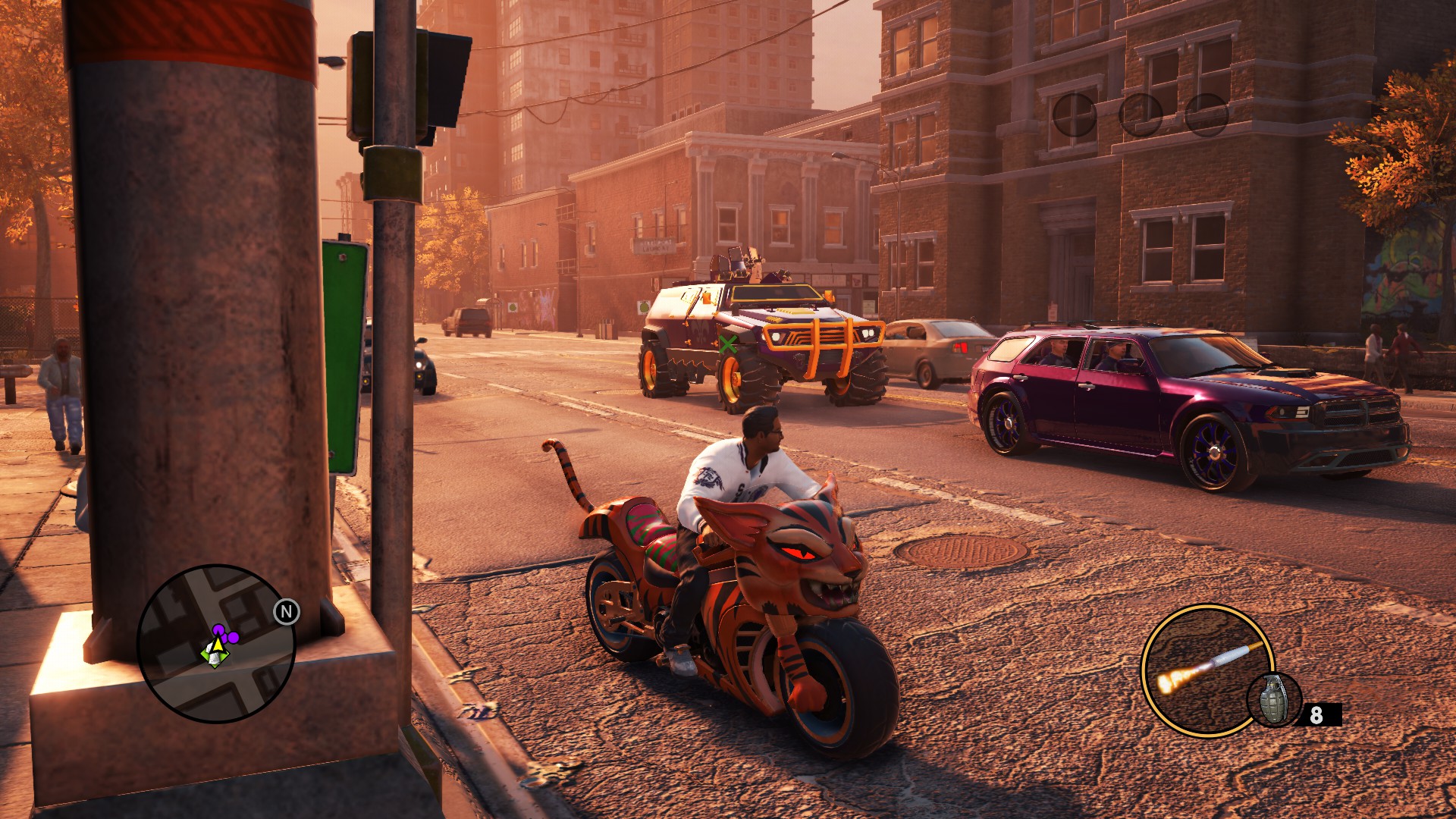
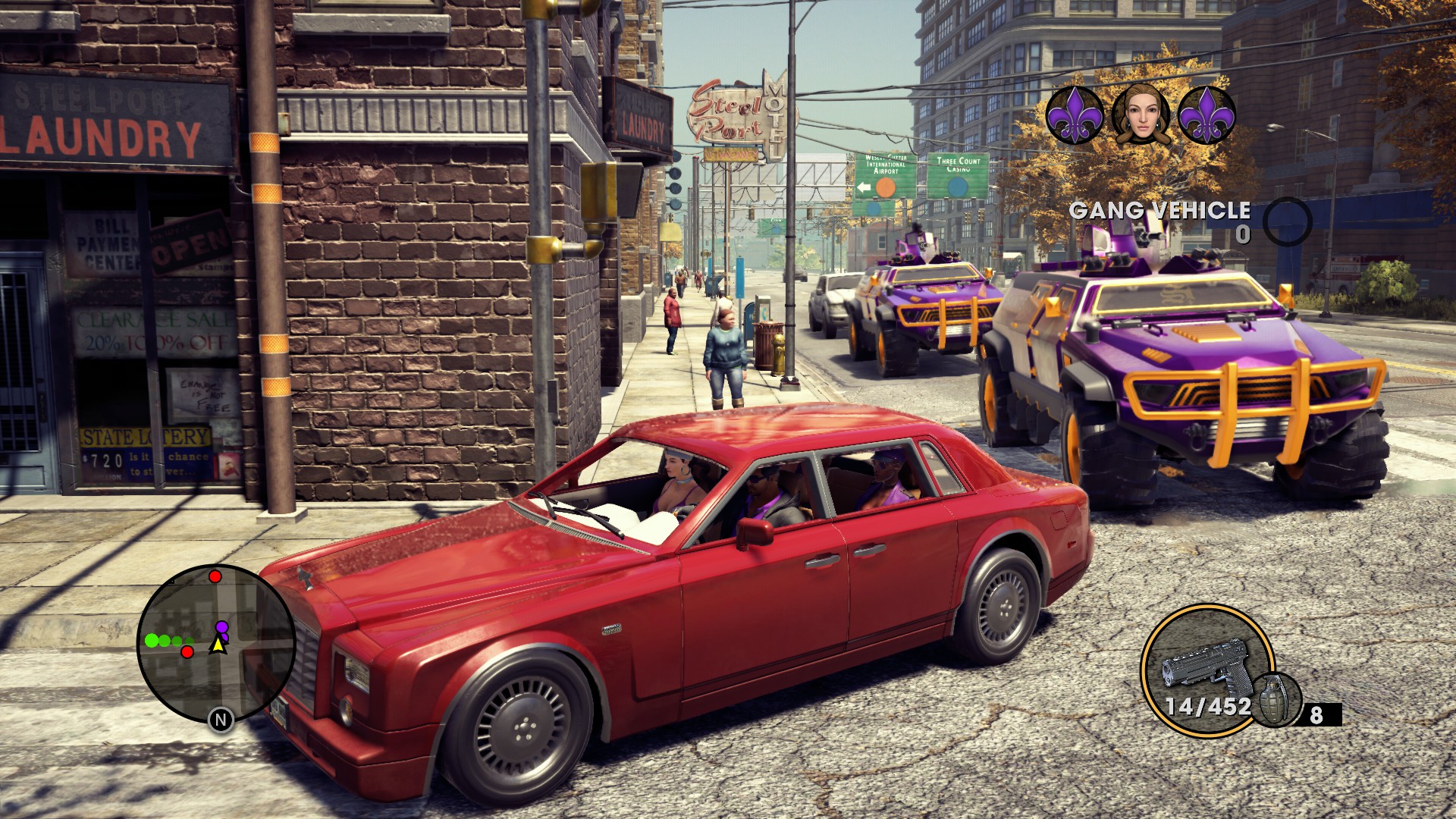
SWAT driving N-Forcers
SNG driving N-Forcers
Saints driving various Saints vehicles
Saints Stripper acting as gunner (My Custom module)
Saints vehicles randomly parked (ONLY for Vanilla module)
Known Bugs
Since the mod is in beta, bugs are to be expected. Current known bugs are as follows:
- If you choose to install the optional "N-Forcer as your Saints Backup vehicle" feature, one Saints member will arrive on foot since it summons 4 Saints, even though an N-Forcer only seats 3. Its just optics since they spawn nearby anyway, nothing game or even immersion-breaking. I could fix it by limiting it to 3 Saints only but I figured why lose out on an extra Saint just for something that doesn't even matter that much. There's already a cooldown on Saints Backup so you get limited reinforcements as it is. I can fix it if there's enough demand for it though.
FAQ
Q: I don't see any changes after installing the mod.
A: Either you didn't install the mod correctly or you haven't taken over the hood you're in. This mod will only work where you have taken over 100% of that district. Another reason is that sometimes the game takes a while to remember you have 100% district ownership and to start spawning your gang. Its a bug - you can drive around in another district for a while and it randomly corrects itself.
Q: I want X homies driving Y vehicles. Why isn't this an option in the mod?
A: Because I can't possibly create every single combination/permutation of every vehicle and gang member type there is. That's why Gang Customization was supposed to take care of this at the click of a button, which it failed to do. If you have the chops, scroll to the next section and follow my DIY guide to make your own customized version.
Q: Why just the Saints N-Forcer, and not the Saints Crusader?
A: Because I like to keep my mods a bit realistic. Crusaders everywhere would be overkill and take the fun out of an already over-the-top experience curated carefully by Volition. Having access to multiple N-Forcers nearby without having to kill STAG or call in a Saints version exactly once, in addition to several of them driven by your comrades backing you up, is already quite powerful and can tip the gameplay balance too much in your favor.
Q: Why did you choose the SWAT/SNG homies, and not any other Saint for the N-Forcer only variant?
A: Because the N-Forcer is a military vehicle so it made the most sense to me.
Q: Why did you choose the Saints N-Forcers as the only vehicles available to the SWAT/SNG homies?
A: Because both the vehicle and the homies in question are military-themed.
Q: I don't see the Saints N-Forcer
A: As of v1.2, I've been successful in solving the mystery of missing parked Hammers, Reapers and Infuegos - but N-Forcers will still not spawn since despite changing their spawn rates, the game engine ignores those because even the base game N-Forcers spawn as scripted events. It was never designed to spawn ambiently parked - an issue I can't solve with the limited tools at my disposal.
Q: The Saints Reaper's trunk door disappears if I look at it from afar.
A: Bug with the model's LOD (Level of Detail). This particular car was never meant for anything aside from that one cutscene where it appears so the devs never bothered fixing it.
Q: Why are some Saints still spawning in civilian vehicles?
A: They do even in the vanilla game. The engine is supposed to spawn them in the Saints variant of that car (as dictated by your Gang Customization settings) but it ignores that. This mod is supposed to be an alternative to that broken system but I didn't replace it.
Q: Why do some N-Forcers spawn without anyone mounting the gun?
A: For variety. Also, every vehicle seat has a randomized chance to spawn a passenger.
Q: I installed the "SNG SWAT + N-Forcer" variant of the mod and the SWAT guys only spawn like 25% of the time?
A: Your math checks out. Since there are 4 different models of the SNG guys and only 1 of the SWAT, they have a 1 in 5 chance of spawning.
Q: Why didn't you add the Saints Neuron that Angel drives in the finale?
A: Meh. Its never been considered a Saints vehicle lore-wise. Plus, even in the game files, the variant flag is specified as "Angel" instead of "Saints". So yeah, even Volition never acknowledged it as a Saints vehicle.
Q: Why didn't you add Penthouse homies in your Custom module? I heard you like them.
A: Whoa! How did you guess that? Anyway, there are a few quirks with the Remastered version of the game where it doesn't like if you mess around with certain files even if they're .xtbl, which is especially true for DLC files, even though all DLCs from the classic version are already included in the remaster. I don't know what the devs did but the DLC content is still in the game as its separate DLC files and it throws a tantrum if you try to screw around with them.
Want to customize the mod to your liking?
If you have what it takes, read on. I accept no responsibility for you fucking up your game if you choose to follow this because it requires carefully modding your game files. If you screw something up, simply delete the files and reinstall the mod again.
Getting started
First things first, you need to download and install at least one module from my mod. I'd suggest choosing the Tactical Module's "SWAT + Saints N-Forcer" if your intended choice of gang type has no overlap with any of the other existing modules in my mod. For this particular demonstration's purposes, I'm going to add all of the strippers as candidates for driving around different Saints vehicles (Infuego, Torch, Criminal, etc).
For this endeavor, you'd mostly just need two files: character.xtbl and spawn_info_groups.xtbl since I've already set up the other files the way they need to be.
Both of these files can be opened with Notepad++ that you can easily find upon googling.
Character.xtbl
Character.xtbl is the file that defines NPCs that spawn in the game. Open this up with Notepad++. As you may have noticed, there is a format that this file follows. It has a lot of entries that look like
<Whatever>value</Whatever>. In this example, we have a "Whatever" flag set to a value. Each row defines a separate character, starting with <Name> flag. The name is something that the game uses to identify or get a hold of a character. Characters have different flags that define different things about them, like what 3D model to display, how they act, what gang they're a part of, etc. and yes, character name has nothing to do with 3D model name; for example you can have a character that is named "npc_John" but the 3D model it represents in the flags could be that of a "Jane" and it won't matter because the game only calls references to the character name, NOT the 3D model name. Similarly, you can have different names or "Character entries" utilizing the same model multiple times. Anyways, as you can see, its a scary mess of text but if you don't let it intimidate you, and inspect it closely, you'll find that this is the format that the game expects the entries to be in so familiarize yourself with this because you do not want to mess this up when you make your changes or your game will crash. Double check your typos.Now, if you do not want the SWAT homies spawning as the gang type, press Ctrl+F and search for "SWAT02" (without quotation marks). Select and highlight this entire row and delete it. Make sure there is no space between the preceding and succeeding rows after you delete it and make sure you don't accidentally delete ANYTHING ELSE.
Now, we must add another character that would drive these vehicles about. For that, you would need to know what character it is that you're looking for. If you are not sure of the name of the category they appear in, check your gang customization in game and remember that name. Once you have it, search for it just like we searched for SWAT02 and you'll find them (make sure, that you verify that its the <Name> flag). It may be impossible for you to determine a particular model within a wider range of category that they're a part of. If so, you may simply have to add them one at a time and check in-game if you've got the right model you want from that category.
Since I'm going to add all of the strippers, I'll search for "stripper" after pressing Ctrl+F. The caveat here is that there are civilian and Saints versions of such NPCs so you have to be careful. Saints versions, that you want, usually start with
<Character><Name>npc_s_ped... Since there are a total of 6 strippers here, "stripper01_fw" to "stripper06_fb", I will need these.The way I go about doing this is simply copying every line, pressing Enter, pasting the same line in the next row. Why do this? Because you don't want to mess with existing characters. The game uses them for its own purposes. Its always safe to make custom copies of every character. You can do this by adding a new line which is basically a copy of the character you want and then make changes in this new line to fit your tastes.
We will now change the name of the character. The name itself follows a particular naming convention which you do not want to mess too much with because the game engine expects them to be alphabetically ordered as well as following these established conventions. Usually, the format for the convention goes like this: [npc]_[class]_[category]_[identifier]. Its not necessary to know how it works but let me break the convention down for you:
[npc] is the title for most Non Playable Characters.
_s_ is an optional tag added to imply that this is the "Saints" version of a model (which probably means you'll find a non _s_ entry of this too, which uses the same model but without the Saints Purple color palette; color palettes are also defined further along in each entry)
The [class] is what class a model belongs to, per their behavior. Peds are usually civilians, that you see walking around on the streets (gangs and police have their own classes).
The [category] is usually another more specialized tag. Like Strippers, Bikers, Clubbers, etc. These are more loosely defined than the others.
Finally, there's the [identifier]. These, for the most part, exist to help you identify the gender and race of the character in question. So "ma" would be "Male Asian", "mb" would be "Male Black", "fw" would be "Female White", "fh" would be "Female Hispanic" and so on.
_s_ is an optional tag added to imply that this is the "Saints" version of a model (which probably means you'll find a non _s_ entry of this too, which uses the same model but without the Saints Purple color palette; color palettes are also defined further along in each entry)
The [class] is what class a model belongs to, per their behavior. Peds are usually civilians, that you see walking around on the streets (gangs and police have their own classes).
The [category] is usually another more specialized tag. Like Strippers, Bikers, Clubbers, etc. These are more loosely defined than the others.
Finally, there's the [identifier]. These, for the most part, exist to help you identify the gender and race of the character in question. So "ma" would be "Male Asian", "mb" would be "Male Black", "fw" would be "Female White", "fh" would be "Female Hispanic" and so on.
I usually just add a number like "01" at the end of the name. So for example, "npc_s_ped_stripper01_fw" becomes "npc_s_ped_stripper01_fw01", "npc_s_ped_stripper06_fb" becomes "npc_s_ped_stripper06_fb01" and so forth.
The next thing to be changed is the <Category>. Always change this to
<Category>Entries:Saints_and_Allies</Category> instead of <Category>Entries:Customization_System_Only</Category>. This is because you don't want to have two copies of the same character in your gang customization options in-game. However, this alone is not enough. You must also make sure that you eliminate any chances of appearing them in the gang customization option. As such, you should scroll right and find the flag <Customization_Category>. Change the value here to "Gangstas" (without quotation" marks). Why Gangstas? Don't worry, I've already set this up for you to use as a category in the other mod files so you can just go ahead and use this customization category. Do not attempt to write anything else instead of Gangstas here because that's the name I've set up for all our ambiently spawning drivers. And no, you won't see these Gangstas in the Gang Customization screen in-game.Next, we scroll even further (make sure you're on the same row) and find the flag
<StreamCategory>. Here, you change the value to "Spawnable Civilian". Why? Because otherwise these guys won't spawn in traffic. Spawnable Saint wouldn't do.You must repeat these steps (from creating a new row to this last step) for each character that you want to add. So if I have 6 strippers, I will do this 6 times, adding a new entry below each original one and modifying it as described above.
Once you're done, ensure that you haven't made any typos anywhere. Then, you may save the file. Ensure the file is in the root installation directory.
spawn_info_groups.xtbl
Moving on, we open spawn_info_groups.xtbl with Notepad++. This is the easy part. We will now tell the game WHAT is being driven and by WHO.
Press Ctrl+F again and search for "spawn_Driver_Bus" (without quotation marks, of course).
Observe. You will notice that there is a flag which starts in
<Characters>. Each entry that comes after that requires a <Character> flag. You just have to fill in the blanks between. Just like you deleted the SWAT homie from the character.xtbl file, you have to delete it from here as well, and fill in the new homies that you added. Remember - this flag supports multiple entries. So, I will make my changes and it would go from:<Characters> <Character>npc_s_cop_SWAT02_mw</Character> </Characters>to:
<Characters> <Character>npc_s_ped_stripper01_fw01</Character> <Character>npc_s_ped_stripper02_fb01</Character> <Character>npc_s_ped_stripper03_fh01</Character> <Character>npc_s_ped_stripper04_fa01</Character> <Character>npc_s_ped_stripper05_fw01</Character> <Character>npc_s_ped_stripper06_fb01</Character></Characters>This would basically tell the game that only the custom characters we added will spawn driving around in Steelport.
But now we need to tell the game WHAT they should be driving around. To do that, we need to go down one row where it says,
<Vehicles>If you don't already know, the game files have internal names for each car. For example, the Saints N-Forcer is called SUV_4DR_02_SAINTS in the files. If you just write "Saints N-Forcer", the game may not spawn anything or at worst, might crash. You can find the list of most cars in the game and what they're called here. Carefully choose the vehicles you need. Ensure that you type the names in the file in lowercase, NOT IN UPPERCASE as in the link above.
As before, this can be configured to have multiple entries. I will now add multiple Saints vehicles to be added to this pool for the game to randomly draw from. So that it goes from:
<Vehicles> <Vehicle> <Name>suv_4dr_02_saints</Name> <Variant>average</Variant> </Vehicle></Vehicles>to:
<Vehicles> <Vehicle> <Name>suv_4dr_02_saints</Name> <Variant>average</Variant> </Vehicle> <Vehicle> <Name>car_4dr_muscle01</Name> <Variant>saints</Variant> </Vehicle> <Vehicle> <Name>suv_4dr_luxury07</Name> <Variant>saints</Variant> </Vehicle> <Vehicle> <Name>car_2dr_muscle02</Name> <Variant>saints</Variant> </Vehicle> <Vehicle> <Name>car_2dr_luxury05</Name> <Variant>saints</Variant> </Vehicle> <Vehicle> <Name>truck_4dr_pickup07</Name> <Variant>saints</Variant> </Vehicle> <Vehicle> <Name>car_4dr_luxury06</Name> <Variant>saints</Variant> </Vehicle> <Vehicle> <Name>car_2dr_sports09</Name> <Variant>saints</Variant> </Vehicle> <Vehicle> <Name>sp_hearse01</Name> <Variant>saints</Variant> </Vehicle></Vehicles>Note here that the N-Forcer (at the top listed as "suv_4dr_02_saints") has the variant flag "Average". I did that because that's how the game is set up. Normally, each car in the game has its name, and then its variants can be "Rough", "Average", "Saints", etc. but the Saints N-Forcer does NOT follow that convention. It was a DLC vehicle and already has the variant defined in its name: suv_4dr_02_saints. As such, it only has ONE variant, "Average" and if you type anything else in it's place, it simply won't spawn.
Another thing to note is that not every vehicle has a Saints variant. The ones I have listed above are the only cars in the game that have a predefined Saints variant. So if you're thinking of listing a Compensator and then defining a Saints variant below that, it won't magically spawn a preconfigured Saints Compensator for you. Nothing would spawn because the devs never designed a Saints Compensator.
As before, once you are done, ensure you have no typos, save the file and then make sure the file is in the root directory.
That should be all you need.
A couple of tips:
- If you started out with the Tactical module and added Saints vehicles like I did in the example above, you may want to snag some or all of the following files (depending on what you add) from my Custom or Vanilla modules in the mod and drop those into your root installation directory as well:
These files are for Saints Infuego (car_4dr_luxury06), Saints Hammer (car_4dr_muscle01) and Saints Reaper (sp_hearse01) and allow them to spawn parked since by default they don't spawn parked for some reason.car_4dr_luxury06.xtbl, car_4dr_luxury06_veh.xtbl, car_4dr_muscle01.xtbl, car_4dr_muscle01_veh.xtbl, sp_hearse01.xtbl, sp_hearse01_veh.xtbl
- spawn_info_categories.xtbl is used to control how frequently the game would spawn vehicles defined under a certain class, as it is itself defined in spawn_info_groups.xtbl (remember "spawn_Driver_Bus"?) This file lists each district separately so you need to set values for each district again and again. I know. It's a lot of work.
- If you make a mistake and your game is crashing or some other weird shit is happening, you can either overwrite the faulty files with the files from my mod or simply delete the files from your root installation directory and everything will go back to normal.
Changelog
v1.2b
- Successfully solved the issue of Saints Hammers, Infuegos and Reapers not spawning parked, for Vanilla and Custom modules
- Added a Custom flavor which is the same as vanilla but with my personal settings to include Strippers and a female biker
- Reduced spawn rates a bit for realism
v1.0b
- Added a Vanilla flavor containing 8 Saints gang members driving 8 different Saints themed vehicles (most of these spawn parked throughout the world too)
v0.5b
- Added two new flavors - "SNG" and "SWAT+SNG" for those who like choices - the tactical module of the mod is now complete
- Added optional file for those who want their Saints Backup to spawn in Saints N-Forcers only
- Removed the need for gang_customization.xtbl
- Added better despawning as option for those who are fed up of vehicles and NPCs disappearing the moment they rotate the camera
v0.2b
- Initial release - SWAT homies driving around in Saints N-Forcers
- Added an extra discreet category for mod-spawned SWAT so that gang customization options stay unaffected
Attachments
Last edited:


