
SR1 - HUD Overhaul

This will change most of the HUD elements within the game. I tried to go for a '90's-2000's look with more focus to the Saint's purple color.

*If you showcase this mod or want to include it in a mod package, please credit me. You have my permission to use it, edit it, reupload it, do as you please. All I ask is you give credit to me, CommyGT/Commy, the creator.
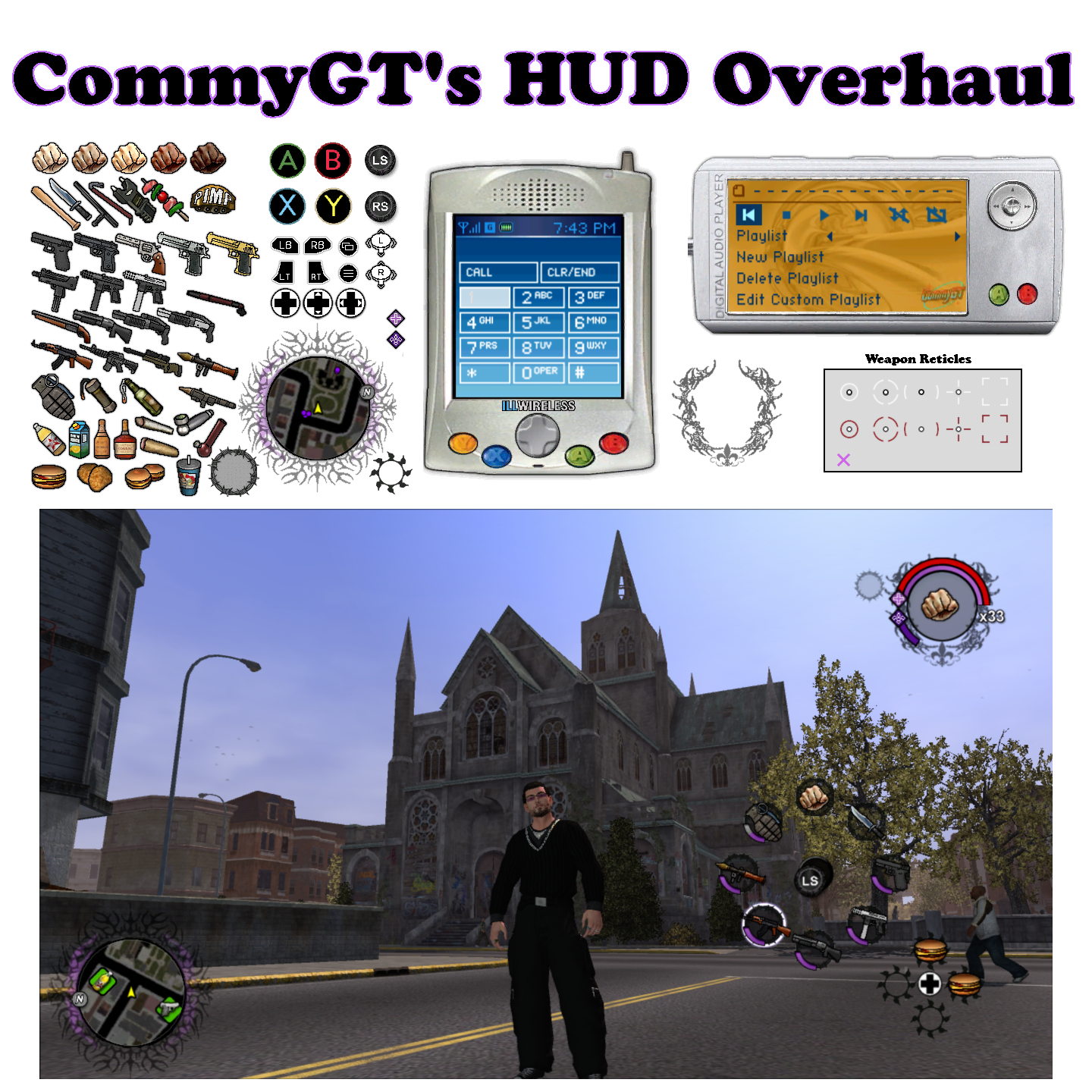
SR1 - HUD Overhaul by CommyGT.png


Requirements:
Xenia Xbox 360 Emulator or RGH/Jtag
Copy of Saints Row (you can obtain this from Flippy's website)
Xbox 360 Backup Creator to extract files from the SR1 ISO
SR1Tools (you can obtain this from Flippy's website)

PICK A VERSION:

There are five skin tones to choose for your Playa. The respective colors are shown in the preview image.
They go left to right, 1 to 5 respectively.

Install:
1.) Put SR1Tools in the root of your Saints Row directory (Make sure there's no spaces in your directory at all, sometimes it causes it not to work).
2.) Go to Saints-Row\packfiles and copy pegfiles.vpp_xbox2
3.) Paste in Saints-Row\SR1TOOLS\1-input
4.) Go to Saints-Row\SR1TOOLS and run the "unpack" batch file
5.) Go to Saints-Row\SR1TOOLS\2-workspace\VPP\pegfiles
6.) Now choose a skin tone from my mod and replace "interface-backend.peg_xbox2" in the pegfiles folder.
7.) Go to Saints-Row\SR1TOOLS and run the "pack" batch file
* - This will create a new "pegfiles.vpp_xbox2" and install to your packfiles folder in your root folder.
** - If you get unauthorized access then most likely the pegfiles.vpp_xbox2 packfile is read-only. Just delete it in your packfile folder and then run the pack batch file again.
8.) You can open the game and start having fun!

Bugs:
Not necessarily a bug but I cannot for the life of me figure out how to change the health color. I was going to use a light purple but sadly I literally just cannot find it!

Notes:
I wanted to get this out before my birthday tomorrow so here it is! I might go into this more in the future but most of everything I wanted to do is done now. Enjoy!
-I may reduce the size of the radar backdrop. While I do it enjoy it I find it can be distracting based off its size and I like subtly more.

v1.0
 

Attachments

Last edited:
Where exactly did you end up changing the stamina colour?
Also happy birthday!~
Inside “pegfiles.vpp_xbox2” there is a file called “interface-backend.peg_xbox2“ and inside there is a bunch of .dds files labeled as Hudsheet from 1-16. The spring bar is just a texture inside there. Which is strange because there’s a health bar too but editing it does literally nothing. And thank you! I’m 27 now. And my car literally died on me this morning so I’m looking for a new one 🥲 that’ll have to be my present to myself.
 
The Cellphone and MP3 Player look soo cool, I love it!

Bugs:
Not necessarily a bug but I cannot for the life of me figure out how to change the health color. I was going to use a light purple but sadly I literally just cannot find it!
Not sure about SR1, but I believe the colour of the health bar in SR2 is dictated by "hud.gsi.lua":
Code:
Hud_gsi_skins = {
    meter = {
        ["Default"] =             { tint = {0.89, 0.749, 0.05}    },        --Default: Yellow            
        ["Health"] =             { tint = {0.75, 0 , 0}             },        --Description: Health
      ["Damage"] =             { tint = {0.89, 0.749, 0.05}    },     --Description: Yellow
      ["Radioactivity"] =  { tint = {0, 1, 0.25}             },        --Description: NEON Greeen
      ["Media"] =                { tint = {0, .5, 1 }             },        --Description: Blue
      ["Taunt"] =             { tint = {0.89, 0.749, 0.05}     },        --Description: Yellow
      ["Fear"] =                 { tint = {0.89, 0.749, 0.05}    },     --Description: Yellow
      ["Pleasure"] =         { tint = {1, 0, .5}                },     --Description: Pink (Escort)
      ["Footage"] =             { tint = {0, .5, 1}                 },     --Description: Blue (Escort)
        ["Mayhem"] =            { tint = {0.89, 0.749, 0.05}    },        --Descirption: Mayhem has special properties where it grabs the colors from hud_mayhem.lua
        ["Fight_Club"] =        { tint = {0.75, 0 , 0}     },                --Descirption: Fight club is basically a red bar but requires special update functionality because the label changes all the time.
        ["Nitrous"] =            { tint = {0, .5, 1 }             },        --Description: Blue
   
    }
}
If "hud_gsi.lua" doesn't exist for sr1, the same code (or similar) might be in another .lua file.

Notes:
I wanted to get this out before my birthday tomorrow so here it is! I might go into this more in the future but most of everything I wanted to do is done now. Enjoy!
Happy Birthday!! 🎉
 
Saints Row 2 has 2 lua virtual machines one for the main game scripting (missions and city) and the other for the UI, all of the UI in that game is run under the vint VM expect for maybe like the tagging screen and black borders which use the Saints Row 1 system.

all of the UI in Saints Row 1 is hardcoded, for some elements and colors they parse the values from xtbls so it's easier to change but for some they're oddly hardcoded the health bar is colored 210,0,0 (RGB)

1764680163145.png


btw you didn't put a download for this
 
The Cellphone and MP3 Player look soo cool, I love it!


Not sure about SR1, but I believe the colour of the health bar in SR2 is dictated by "hud.gsi.lua":
Code:
Hud_gsi_skins = {
    meter = {
        ["Default"] =             { tint = {0.89, 0.749, 0.05}    },        --Default: Yellow           
        ["Health"] =             { tint = {0.75, 0 , 0}             },        --Description: Health
      ["Damage"] =             { tint = {0.89, 0.749, 0.05}    },     --Description: Yellow
      ["Radioactivity"] =  { tint = {0, 1, 0.25}             },        --Description: NEON Greeen
      ["Media"] =                { tint = {0, .5, 1 }             },        --Description: Blue
      ["Taunt"] =             { tint = {0.89, 0.749, 0.05}     },        --Description: Yellow
      ["Fear"] =                 { tint = {0.89, 0.749, 0.05}    },     --Description: Yellow
      ["Pleasure"] =         { tint = {1, 0, .5}                },     --Description: Pink (Escort)
      ["Footage"] =             { tint = {0, .5, 1}                 },     --Description: Blue (Escort)
        ["Mayhem"] =            { tint = {0.89, 0.749, 0.05}    },        --Descirption: Mayhem has special properties where it grabs the colors from hud_mayhem.lua
        ["Fight_Club"] =        { tint = {0.75, 0 , 0}     },                --Descirption: Fight club is basically a red bar but requires special update functionality because the label changes all the time.
        ["Nitrous"] =            { tint = {0, .5, 1 }             },        --Description: Blue
  
    }
}
If "hud_gsi.lua" doesn't exist for sr1, the same code (or similar) might be in another .lua file.


Happy Birthday!! 🎉
Thank you! The birthday was awful lol. My car fully died on me and no luck still finding a new one but there is Toyota Camry I'm looking at right now for 7 grand. And yes, thank you again, the Cellphone and MP3 Player were a lot of fun to make! Especially their backgrounds. And dude I cannot find this health color to save my life haha. I did open every .lua and every .xtbl file in both misc1 and misc2 and just searched all documents for "health" but no avail.
 
Saints Row 2 has 2 lua virtual machines one for the main game scripting (missions and city) and the other for the UI, all of the UI in that game is run under the vint VM expect for maybe like the tagging screen and black borders which use the Saints Row 1 system.

all of the UI in Saints Row 1 is hardcoded, for some elements and colors they parse the values from xtbls so it's easier to change but for some they're oddly hardcoded the health bar is colored 210,0,0 (RGB)

View attachment 46562

btw you didn't put a download for this
Oooohhhh my God, lmfao. You're right I did not put a download! I messed up on the most important part of the post haha, I'll have to fix this. Also yeah I feel like it is hardcoded because I just cannot find it to save my life. But yeah, that picture is about how I'd make the purple, maybe lighter, idk. But it's so unfortunate I can't find it. Also your character gave me a cackle lol

Edit: File should be uploaded now, thanks for telling me! I feel super stupid right now :)
 
Back
Top