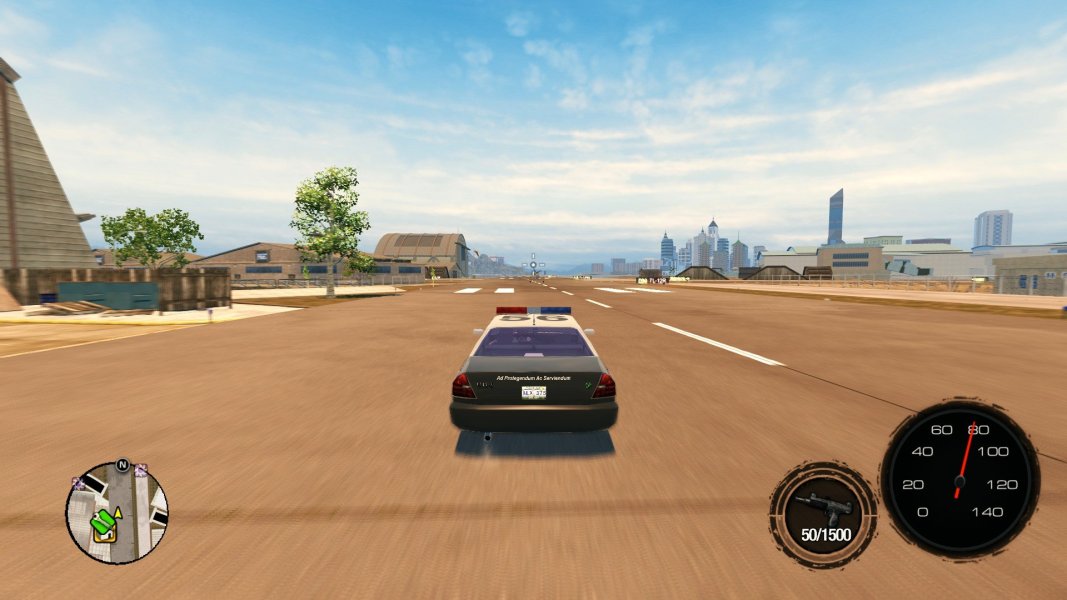
Speedometer for Saints Row 2
This speedometer is configurable, with per-vehicle settings via the speedometer.ini file, and per-vehicle speedometer visuals. Extract the ZIP and place the ASI file within a "scripts", "plugins", or "update" folder once you have installed the Ultimate ASI loader. Place textures and the speedometer.ini file within a "textures" folder in the same directory as the ASI itself.
For per-vehicle settings, create entries with the name of the individual vehicle:
Any missing values will be inherited from the default values.[default]
needle_pivot_x=8
needle_pivot_y=100
needle_angle_min=225
needle_angle_max=510
speedometer_x=0.90
speedometer_y=0.80
max_speed = 140
fade_speed = 2.5
[car_4dr_police01]
max_speed = 120
For per-vehicle images, create and name images in the following format:
(internal_name)_background.png / (internal_name)_needle.png
car_4dr_police01_background.png / car_4dr_police01_needle.png
Any missing images will be replaced by the default image.
For disclosure, the code for this project was developed with over 90% AI-generated code, as I am not familiar with C or C++. I would like to call this more of a proof of concept; the memory addresses and general idea are included in the source code: https://github.com/ithinkimcats/SR2Speedometer
If someone wishes to make a better version of this using what is provided there, that would be really cool and awesome.